
This post goes inside Terraform: its plugin-based architecture, how the core engine works, what providers really are, how the dependency graph is built, and what state actually does.
The Big Picture
At its core, Terraform is a desired state engine. You describe what infrastructure you want, and Terraform figures out how to make reality match that description.
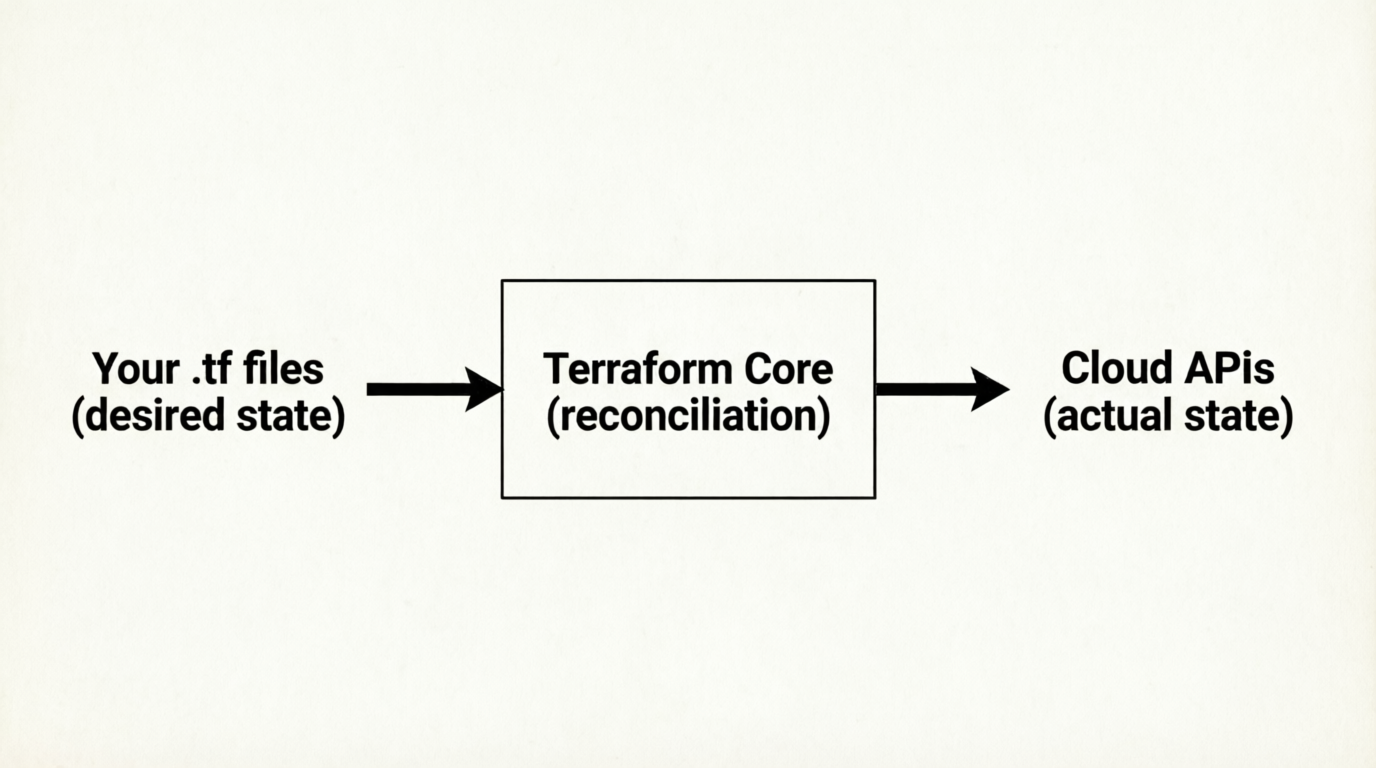
But Terraform itself doesn't know how to talk to AWS, Azure, or any cloud platform. That's the job of providers. The Terraform binary is essentially a thin orchestration layer that delegates all real work to plugins.
Plugin-Based Architecture
When you run terraform init, Terraform reads your configuration and downloads the providers you've declared — these are separate binaries that Terraform spawns as child processes.
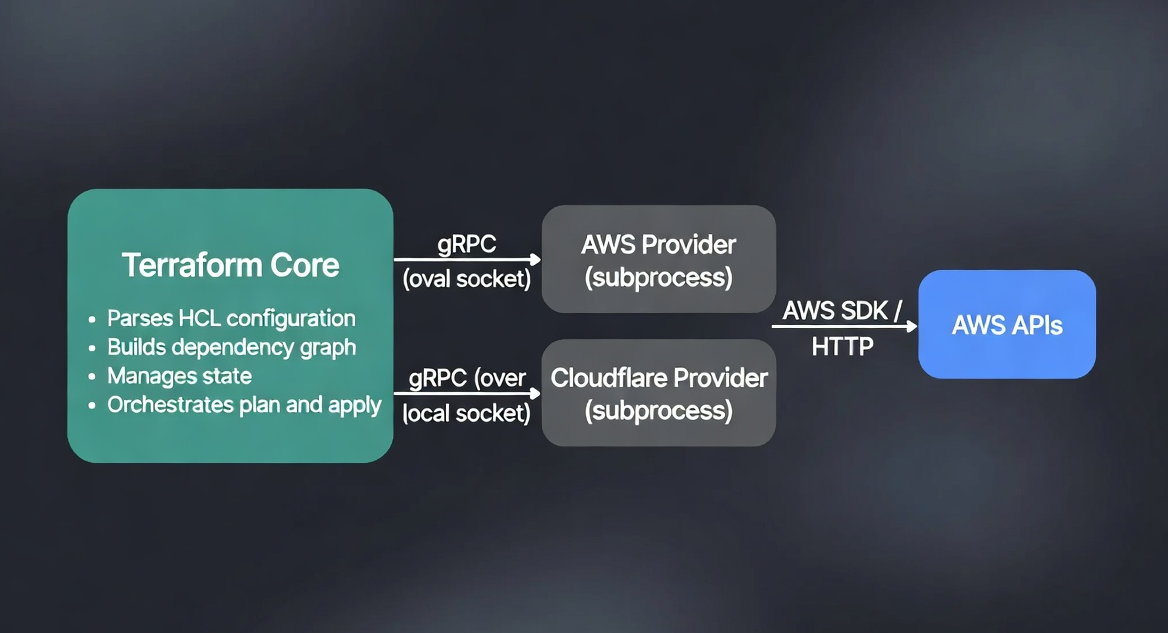
Terraform and its providers communicate over gRPC on a local Unix socket. This is why:
- Providers can be written in any language (they just need to implement the gRPC interface)
- A crash in a provider doesn't crash Terraform core
- Providers are versioned independently of Terraform itself
The .terraform/ directory created by terraform init contains the downloaded provider binaries and a lock file (.terraform.lock.hcl) that pins exact versions.
The Provider Block: More Than Just Configuration
The provider block is commonly understood as "set the region." But it does more than that.
provider "aws" {
  region = "us-east-1"
}
What this actually does:
- Tells Terraform to download and launch the
hashicorp/awsprovider plugin - Passes the configuration arguments to the provider process at startup
- Establishes the gRPC channel between Terraform core and the provider subprocess
- Makes all
aws_*resource types available in your configuration
You can have multiple instances of the same provider with aliases — useful for multi-region or multi-account deployments:
provider "aws" {
  alias  = "us_east_one"
  region = "us-east-1"
}

provider "aws" {
  alias  = "eu_west_one"
  region = "eu-west-1"
}

resource "aws_instance" "us_server" {
  provider      = aws.us_east_one
  ami           = "ami-0c55b159cbfafe1f0"
  instance_type = "t2.micro"
}

resource "aws_instance" "eu_server" {
  provider      = aws.eu_west_one
  ami           = "ami-0e1d2f3a4b5c6d7e8"  # Amazon Linux 2 in eu-west-1
  instance_type = "t2.micro"
}
The Resource Block: A Contract with the Provider
When you write a resource block, you are not writing a script. You are declaring a desired state contract.
resource "aws_instance" "web_server" {
  ami           = "ami-0c55b159cbfafe1f0"
  instance_type = "t2.micro"
}
Terraform does not read this and think "run these steps." It reads it and thinks: "There should exist an EC2 instance with these properties." The provider is responsible for translating that declaration into the actual API calls needed to create, update, or delete the resource.
Every resource type has a CRUD lifecycle managed by the provider:
- Create — called when a resource doesn't exist yet
- Read — called during
planto check the current state - Update — called when arguments change but the resource can be modified in-place
- Delete — called during
destroyor when a resource is removed from config
Some changes force a replacement (destroy + create) rather than an update — for example, changing the ami of a running EC2 instance. Terraform shows these in the plan as -/+ (destroy then create).
The Dependency Graph
Terraform builds a directed acyclic graph (DAG) of all your resources before doing anything. This graph determines the order of operations.
Dependencies come from two sources:
1. Implicit dependencies (references)
When one resource references another, Terraform infers the dependency automatically:
resource "aws_security_group" "instance" {
  name = "my-sg"
  # ...
}

resource "aws_instance" "web" {
  vpc_security_group_ids = [aws_security_group.instance.id]  # reference
  # ...
}
Because aws_instance.web references aws_security_group.instance.id, Terraform knows the security group must be created first. No manual ordering needed.
2. Explicit dependencies (depends_on)
For cases where a dependency exists but isn't captured in a reference:
resource "aws_instance" "web" {
  ami           = "ami-0c55b159cbfafe1f0"
  instance_type = "t2.micro"

  depends_on = [aws_iam_role_policy.example]
}
The graph is what enables parallelism. Resources with no dependency relationship between them are created simultaneously, making large deployments much faster.
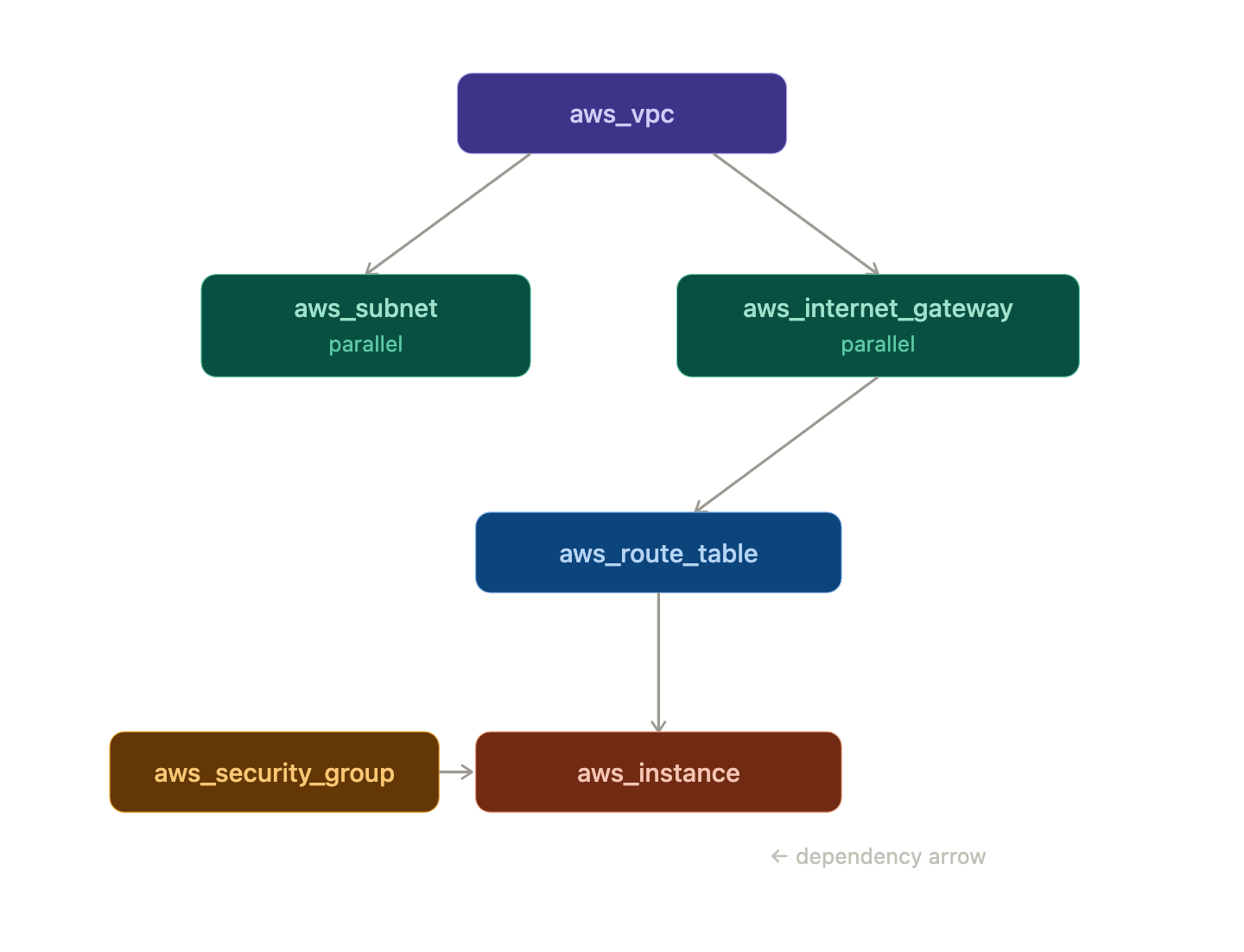
Everything on the same "level" of the graph runs in parallel. Terraform default parallelism is 10 concurrent operations.
Terraform State: The Source of Truth
State is the most important concept to understand deeply. The file terraform.tfstate is how Terraform knows what it has already created.
What state contains
{
  "resources": [
    {
      "type": "aws_instance",
      "name": "web_server",
      "instances": [
        {
          "attributes": {
            "id": "i-0abc123def456",
            "ami": "ami-0c55b159cbfafe1f0",
            "instance_type": "t2.micro",
            "public_ip": "54.123.45.67",
            ...
          }
        }
      ]
    }
  ]
}
State maps your configuration's logical names (aws_instance.web_server) to real cloud resource IDs (i-0abc123def456). Without this mapping, Terraform would have no way to know that aws_instance.web_server in your code corresponds to a specific running instance in AWS.
The plan cycle
Every terraform plan does the following:
1. Read .tf files               →  desired state
2. Read terraform.tfstate       →  last known state
3. Call provider Read()         →  actual current state
4. Diff (desired vs actual).    →  proposed changes
This three-way comparison is what makes Terraform's plans accurate and safe.
Why state can go wrong
State gets out of sync when infrastructure is modified outside of Terraform — manually in the console, by another tool, or by another team member. This is called state drift. Running terraform plan will detect the drift, but it's better to avoid it by treating Terraform as the single source of truth for any infrastructure it manages.
For teams, state should always be stored remotely (S3 + DynamoDB for AWS) with locking enabled, never as a local file committed to git.
The Lifecycle of a Terraform Run
Putting it all together — here is what actually happens step by step when you run terraform apply:
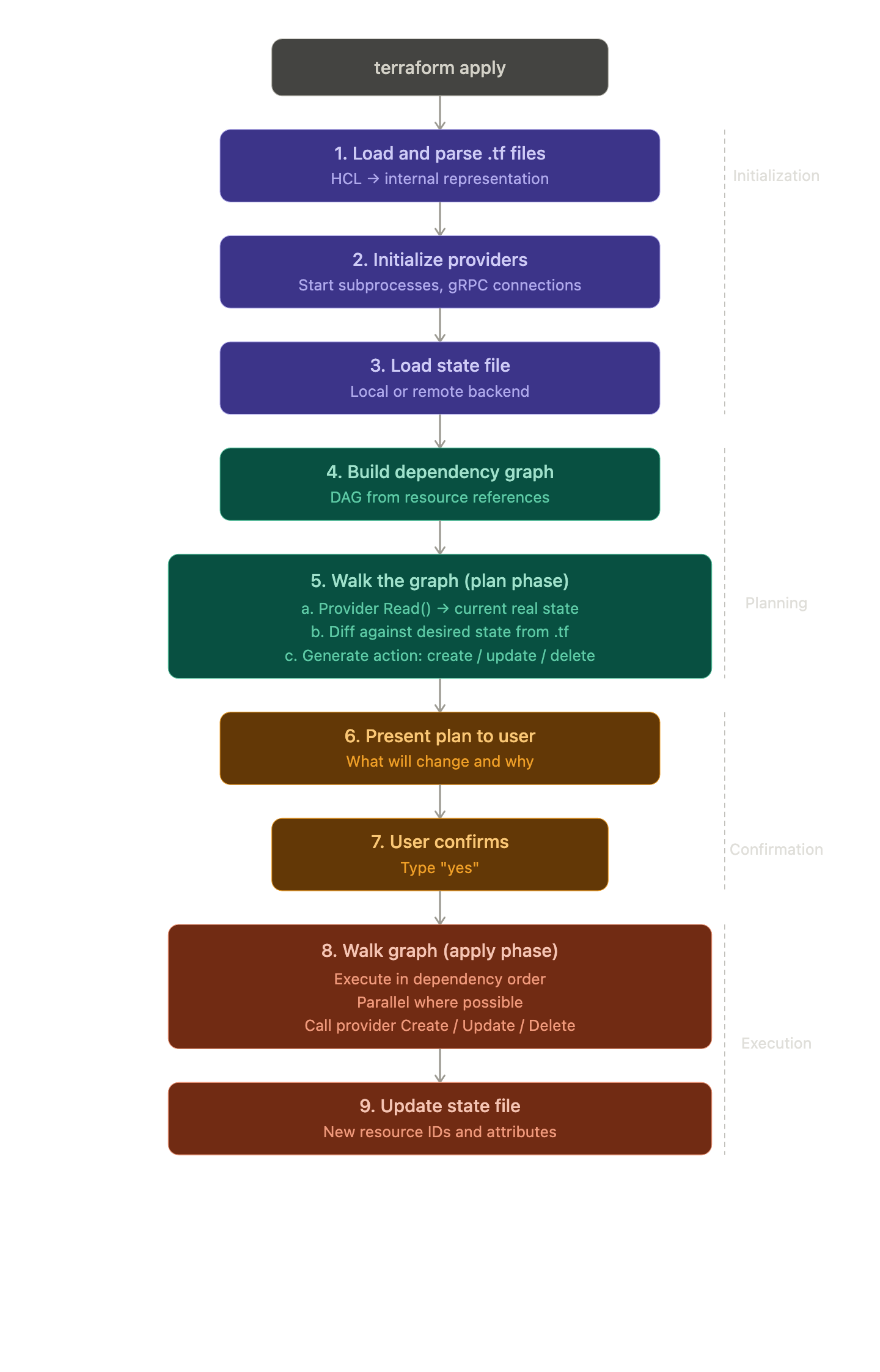
Every step is intentional. The separation of plan and apply means you always see exactly what will change before it happens — a crucial safety property.
HCL: The Language Terraform Uses
Terraform configurations are written in HashiCorp Configuration Language (HCL). It's designed to be human-readable and to support expressions, references, and functions — while still being simple enough to parse mechanically.
Key HCL features you'll use constantly:
# Variables
variable "instance_type" {
  default = "t2.micro"
}

# References
resource "aws_instance" "web" {
  instance_type = var.instance_type
}

# Expressions and built-in functions
locals {
  name = "web-${terraform.workspace}"
  tags = merge(var.common_tags, { Name = local.name })
}

# Outputs
output "ip" {
  value = aws_instance.web.public_ip
}
HCL is declarative by design — you describe what you want, not the steps to get there. This is a deliberate choice that makes configurations easier to read, diff, and reason about.
Summary
| Component | What It Does |
|---|---|
| Terraform Core | Parses config, builds graph, manages state, orchestrates plan/apply |
| Provider | Subprocess plugin that translates resource declarations into API calls |
provider block |
Configures and initializes a provider plugin |
resource block |
Declares a desired infrastructure state contract |
| Dependency graph (DAG) | Determines creation order and enables parallelism |
| State file | Maps logical resource names to real cloud resource IDs |
| Plan | Three-way diff: desired config vs. state vs. actual cloud reality |
| HCL | Declarative language for expressing desired infrastructure state |
Conclusion
Terraform's power comes from its architecture. The plugin model keeps the core small and extensible. The dependency graph enables correctness and parallelism simultaneously. State makes idempotent changes possible. And the plan/apply separation gives you confidence before anything real changes.
Understanding these internals transforms Terraform from a tool you follow recipes with into one you can reason about — which matters when things go wrong, when you're debugging unexpected plans, or when you're designing infrastructure for a production system.
This post is part of a 30-day Terraform learning journey.
💬 Comments
No comments yet. Be the first to share your thoughts!
Leave a Comment