
Why Infrastructure Deployments Are Different
Application code and infrastructure code both go through version control, both need tests, and both flow through environments before reaching production. But the operational characteristics diverge significantly:
| Dimension | Application code | Infrastructure code |
|---|---|---|
| Change frequency | Multiple times per day | Weekly or on-demand |
| Deployment time | 3–5 minutes (image swap) | 10–45 minutes (resource provisioning) |
| Blast radius | Usually one service | Can span multiple services and accounts |
| Rollback | Swap image tag — 3 minutes | Re-apply old code — may not be possible for some resources |
| Destructive changes | Rare — most changes are additive | Common — changing an attribute often forces resource replacement |
| State drift | Not a concern | Manual console changes create silent divergence |
| Test coverage | Unit tests run in seconds | Integration tests require real AWS resources |
The key implication: an application deployment failure is a bad user experience that you resolve in minutes. An infrastructure deployment failure can leave the environment partially updated, with some resources at the new config and others at the old one — a state that can be difficult to reason about and expensive to repair.
Why infrastructure rollback is the hard part. Application rollback is a tag swap — the old image still exists, the orchestrator points traffic back to it. Infrastructure rollback may require restoring a backup, recreating a destroyed resource from scratch, or accepting that the change is irreversible (e.g., an RDS major version upgrade that has already migrated the data file format). The asymmetry is not in the tooling — it is in the nature of the resources themselves.
This asymmetry is why infrastructure changes always require a human to read the plan before applying, even in automated pipelines.
The Module Promotion Workflow
The FastAPI stack's infrastructure is split into versioned modules: terraform-aws-networking, terraform-aws-alb, terraform-aws-asg, terraform-aws-rds. When a module changes, that change propagates through environments in sequence:
Module repository (terraform-aws-asg)
          │
     Engineer makes change
          │
     PR → CI: validate, tflint, checkov, terraform test
          │
     Merge to main
          │
     Tag new version: v1.5.0
          │
     HCP Terraform private registry indexes v1.5.0
          │
          ├──► Dev environment: update version pin → terraform apply
          │              │
          │         Validate in dev
          │              │
          ├──► Staging: update version pin → plan review → terraform apply
          │              │
          │         Validate in staging
          │              │
          └──► Prod: update version pin → plan review → human approval → apply
Each environment independently decides when to adopt the new version. Dev picks it up immediately after tagging. Staging picks it up after dev validation. Production picks it up after staging validation and a human sign-off.
This decoupled promotion model means a breaking change in a module is caught in dev and never reaches prod — without blocking other environments from receiving unrelated module updates.
Step-by-Step: The 7-Stage Infrastructure Workflow
Stage 1: Make the change in a feature branch
The engineer changes modules/asg/main.tf — for example, adding IMDSv2 enforcement to the launch template (the security fix from Day 18's checkov scan):
git checkout -b fix/imdsv2-enforcement
# modules/asg/main.tf — add metadata_options block to aws_launch_template
resource "aws_launch_template" "web" {
  # ... existing config

  metadata_options {
    http_endpoint               = "enabled"
    http_tokens                 = "required"
    http_put_response_hop_limit = 1
  }
}
git push origin fix/imdsv2-enforcement
Stage 2: Run CI on the module PR
The module repository has its own CI workflow, separate from the environment repositories:
# .github/workflows/module-ci.yml  (in terraform-aws-asg repo)
on:
  pull_request:
    branches: [main]

jobs:
  validate:
    runs-on: ubuntu-latest
    steps:
      - uses: actions/checkout@v4
      - uses: hashicorp/setup-terraform@v3

      - name: fmt check
        run: terraform fmt -recursive -check

      - name: validate
        run: |
          terraform init -backend=false
          terraform validate

      - name: tflint
        uses: terraform-linters/setup-tflint@v4
      - run: tflint --recursive

      - name: checkov
        uses: bridgecrewio/checkov-action@v12
        with:
          directory: .
          framework: terraform
          check: HIGH,CRITICAL

  unit-test:
    needs: validate
    runs-on: ubuntu-latest
    steps:
      - uses: actions/checkout@v4
      - uses: hashicorp/setup-terraform@v3
        with:
          terraform_version: "~> 1.6"
      - name: terraform test (unit)
        run: terraform test -filter=tests/unit.tftest.hcl

  integration-test:
    needs: unit-test
    if: github.base_ref == 'main'
    runs-on: ubuntu-latest
    permissions:
      id-token: write
      contents: read
    steps:
      - uses: actions/checkout@v4
      - uses: aws-actions/configure-aws-credentials@v4
        with:
          role-to-assume: arn:aws:iam::${{ secrets.AWS_ACCOUNT_ID }}:role/GitHubActionsRole
          aws-region: us-east-1
      - uses: actions/setup-go@v5
        with:
          go-version: "1.21"
      - name: Terratest integration
        run: go test -v -run TestWebAppModule -timeout 30m
        working-directory: test
The integration test deploys real AWS resources to verify the IMDSv2 change does not break the launch template, instance startup, or ALB health checks.
Stage 3: Code review and merge
The PR shows the diff: one new metadata_options block added to aws_launch_template. The reviewer checks:
- Does the unit test cover this attribute?
- Does the
terraform testoutput confirmhttp_tokens = "required"is set? - Does the integration test pass?
After approval and merge, the module is at the new code on main but no version tag has been created yet. No environment is affected.
Stage 4: Tag and publish the new version
git tag v1.5.0
git push origin v1.5.0
The HCP Terraform private registry detects the new tag via webhook and indexes version 1.5.0 of mohamednourdine-org/asg/aws. The changelog entry is generated from the commit messages between v1.4.0 and v1.5.0.
The new version is now available to all workspaces, but no environment has adopted it yet.
Stage 5: Deploy to dev
In the dev environment's root config, update the version pin:
# environments/dev/main.tf
module "asg" {
  source  = "app.terraform.io/mohamednourdine-org/asg/aws"
  version = "~> 1.5"   # was ~> 1.4
  # ...
}
terraform init -upgrade   # resolves 1.5.0 from the registry
terraform plan            # shows: aws_launch_template.web will be updated in-place
terraform apply
The plan output is critical here. For this particular change (adding metadata_options), the expected plan is an in-place update to the launch template — not a replacement. Confirm this before applying:
# aws_launch_template.web will be updated in-place
~ resource "aws_launch_template" "web" {
    + metadata_options {
        + http_endpoint               = "enabled"
        + http_tokens                 = "required"
        + http_put_response_hop_limit = 1
      }
  }
An in-place launch template update does not cycle instances. The new configuration takes effect the next time an instance launches (triggered by an instance refresh or natural replacement). In dev, trigger an instance refresh to validate:
aws autoscaling start-instance-refresh \
  --auto-scaling-group-name $(terraform output -raw asg_name) \
  --preferences '{"MinHealthyPercentage": 90}'
Verify the new instance has IMDSv2 enforced:
# No token — IMDSv2 enforced means this returns 401
curl -is http://169.254.169.254/latest/meta-data/instance-id | head -1
# → HTTP/1.1 401 Unauthorized

# With a token — succeeds
TOKEN=$(curl -s -X PUT "http://169.254.169.254/latest/api/token" \
  -H "X-aws-ec2-metadata-token-ttl-seconds: 60")
curl -s -H "X-aws-ec2-metadata-token: $TOKEN" \
  http://169.254.169.254/latest/meta-data/instance-id
# → i-0abc1234567890abc
Stage 6: Deploy to staging
After dev validation, open a PR to the staging environment config:
# environments/staging/main.tf
module "asg" {
  source  = "app.terraform.io/mohamednourdine-org/asg/aws"
  version = "~> 1.5"   # was ~> 1.4
}
The PR triggers a speculative plan in the staging HCP Terraform workspace. The reviewer sees the same in-place update shown in dev. After approval:
- HCP Terraform queues the run (auto-apply: disabled for staging)
- A second engineer reviews the plan in the HCP Terraform UI and clicks Confirm & Apply
- Instance refresh rolls the change across all staging instances
Stage 7: Deploy to production
After staging validation, the same version pin update is applied to the prod environment config. In production:
- Auto-apply is off
- Sentinel policy runs between plan and apply (the IMDSv2 policy from Day 19 now passes, since
http_tokens = "required"is set) - A senior engineer reviews and approves the run in HCP Terraform
- The apply executes during a low-traffic window
The total time from merge to module main to production: 1–2 days, with explicit human validation at each environment.
Handling Destructive Changes
Not all infrastructure changes are safe in-place updates. Some force resource replacement — the -/+ plan symbol — and need special handling.
Identifying destructive changes
Common attribute changes that force replacement in the FastAPI stack:
| Resource | Attribute change | Effect |
|---|---|---|
aws_launch_template |
name or name_prefix |
Replacement — new template, old one deleted |
aws_autoscaling_group |
name |
Replacement — all running instances terminated |
aws_db_instance |
engine_version (major) |
Replacement — RDS stops, new instance starts |
aws_db_instance |
identifier |
Replacement — old database deleted |
aws_security_group |
name |
Replacement — destroy can fail while attached, requires create_before_destroy |
aws_lb |
name |
Replacement — DNS name changes, Route 53 update required |
Always read the full plan before applying any infrastructure change. A -/+ on the ASG is never routine.
Safe mitigation with create_before_destroy
For resources where a brief replacement gap is unacceptable, the create_before_destroy lifecycle block (from Day 12) ensures the new resource is healthy before the old one is deleted:
resource "aws_autoscaling_group" "web" {
  # ...
  lifecycle {
    create_before_destroy = true
  }
}
With this in place, a forced ASG replacement:
- Creates the new ASG with the new name
- Waits for the new ASG's instances to pass health checks
- Deletes the old ASG
Capacity never drops below min_size during the replacement.
Planned replacement with -replace
When a resource has drifted and needs to be replaced (but the Terraform config has not changed), use -replace to force a single replacement without modifying the config:
# Force-replace a specific instance that is unhealthy
terraform apply -replace="aws_instance.web[0]"

# Force-replace a launch template to pick up a new AMI
terraform apply -replace="aws_launch_template.web"
This is preferable to terraform taint (deprecated in Terraform 0.15.2 — it still works in 1.x but emits a deprecation warning) and avoids editing the configuration just to trigger a replacement.
Communicating destructive changes to the team
Before applying a -/+ change in any shared environment, communicate:
- What is being replaced: the resource address and why
- Impact: downtime, DNS changes, credential rotation needed
- Timing: during a scheduled maintenance window or low-traffic period
- Rollback plan: what happens if the new resource does not come up healthy
A short Slack message ("Replacing the prod ALB at 14:00 UTC — DNS will propagate over 5 minutes, smoke tests will run after") prevents the on-call engineer from treating the event as an incident.
Drift Detection
Drift occurs when the real infrastructure diverges from the Terraform state. Common causes:
- An engineer made a manual change in the AWS console to resolve an incident
- AWS Auto Scaling changed the instance count and Terraform's
desired_capacityis out of sync - A resource was modified by a different Terraform config (or a different team's config)
- An AWS service updated a managed attribute automatically (e.g., RDS minor version auto-upgrade)
Scheduled drift detection runs
Configure HCP Terraform to run terraform plan on a schedule — without applying — to surface drift:
In the workspace settings under Health, two related (but distinct) features handle this:
- Drift Detection: scheduled refresh-only plan that flags the workspace as Drifted when the real infrastructure no longer matches state. This is the feature being described in this section.
- Continuous Validation: runs custom
check {}block assertions against the live infrastructure on a schedule (e.g., "the ALB is reachable", "the certificate is not within 30 days of expiry").
Both are grouped under "health assessments" in the UI. Both are Plus-tier features — they are not available on the free Standard tier.
For self-managed CI (or HCP Terraform free tier), the equivalent is a nightly scheduled workflow:
# .github/workflows/drift-detection.yml
on:
  schedule:
    - cron: "0 6 * * *"   # 6 AM UTC daily

jobs:
  drift-check:
    runs-on: ubuntu-latest
    permissions:
      id-token: write
      contents: read
    strategy:
      matrix:
        environment: [dev, staging, prod]
    steps:
      - uses: actions/checkout@v4
      - uses: aws-actions/configure-aws-credentials@v4
        with:
          role-to-assume: ${{ secrets[format('AWS_ROLE_{0}', matrix.environment)] }}
          aws-region: us-east-1
      - uses: hashicorp/setup-terraform@v3
      - name: Detect drift in ${{ matrix.environment }}
        run: |
          cd environments/${{ matrix.environment }}
          terraform init
          terraform plan -detailed-exitcode
        # Exit code 0: no changes
        # Exit code 1: error
        # Exit code 2: changes detected (drift found)
When the nightly plan returns exit code 2, the pipeline notifies the team. The drift is either:
- Expected and safe (e.g., Auto Scaling adjusted desired_capacity): add
ignore_changes = [desired_capacity]to the ASG - Unexpected (someone changed a security group rule manually): revert via
terraform applyor document the manual change as a legitimate exception
Refresh-only plans for inspection
terraform plan -refresh-only is the safer cousin of a regular plan for drift inspection — it refreshes state from the real infrastructure and shows what changed, without proposing any configuration-driven changes:
terraform plan -refresh-only
# → shows differences between state and real infra,
#   without trying to "fix" them by reverting to the config
Use this when you suspect drift but don't want the plan output cluttered with normal config-vs-state diffs. Pair with terraform apply -refresh-only to update state to match reality (after confirming the manual change should be kept).
Importing legitimate drift
If a manual change should be kept, import it into state rather than overwriting it:
# The security group was manually updated — import the current AWS state
terraform import aws_security_group.web sg-0abc1234567890abc

# Plan should now show no changes
terraform plan
# → No changes. Infrastructure is up-to-date.
Never terraform apply over a manual change without understanding why it was made.
Rollback Strategies
Infrastructure rollback is the hardest problem in this workflow. Unlike application code (swap the image tag, done), Terraform rollbacks range from trivial to impossible depending on what was changed.
Case 1: Config-only change (safe rollback)
A change that only modified a Terraform attribute without replacing a resource — for example, changing max_size from 6 to 8 — rolls back by reverting the git commit and re-applying:
git revert HEAD --no-edit
git push origin main
# CI applies the reverted config: max_size goes back to 6
terraform apply of the old config resets the attribute in-place. No resource replacement, no data loss.
Case 2: New resource added (rollback destroys it)
A new RDS read replica was added and now needs to be removed:
# Remove the resource from the config
# Then:
terraform plan    # shows: - aws_db_instance.replica will be destroyed
terraform apply   # destroys the replica
The rollback is clean as long as no data was written to the replica that needs to be preserved.
Case 3: Destructive change that cannot be undone
An RDS engine version was upgraded (db.postgres 14 → db.postgres 15). The old instance is gone. Rolling back would require:
- Restoring from the automated backup taken before the upgrade
- Updating the Terraform config to the old engine version
- Applying — which creates a new RDS instance at the old version
This takes 30–60 minutes and may not restore all data written since the backup. This is why major version upgrades require a maintenance window and a tested rollback plan before the apply runs.
Case 4: State-level rollback with terraform state
If a resource was accidentally removed from state (not from AWS), it can be re-added without recreating it:
# Re-import the resource that was accidentally removed from state
terraform import aws_lb.main arn:aws:elasticloadbalancing:us-east-1:123456789:loadbalancer/app/fastapi-prod/abc123
If a resource was accidentally created and needs to be removed from state without destroying it in AWS:
# Remove from state (resource stays in AWS, Terraform stops tracking it)
terraform state rm aws_instance.temp_debug
Use state rm when a resource needs to be managed manually or adopted by a different Terraform config.
State file backup — platform differences
State rollback is only possible if old state versions exist. The two backends differ:
- Self-managed S3: requires bucket versioning enabled (easy to forget), an S3 lifecycle rule that doesn't aggressively prune old versions, and ideally cross-region replication for disaster recovery. Without these, a corrupted state file is a corrupted state file with no recovery path.
- HCP Terraform: state versioning is built-in. Every apply produces a new state version, all versions are retained, and you can roll back from the workspace's States tab with one click.
If you operate a self-managed backend, audit the bucket's versioning and lifecycle policy before you ever need it.
The rollback decision matrix
Before applying any infrastructure change, decide the rollback strategy upfront:
| Change type | Rollback method | Time | Data risk |
|---|---|---|---|
| Attribute update (in-place) | Revert commit + apply | 5–10 min | None |
| New resource added | Remove from config + apply | 5–30 min | None (if no data) |
Resource replaced (-/+) |
Revert commit + apply (re-replaces back) | 10–45 min | Depends on resource |
| Major version upgrade | Restore from backup + apply old config | 30–90 min | Potential data loss |
| State file corrupted | Restore state from S3 versioning | 10–30 min | None |
If the rollback time or data risk is unacceptable, consider deferring the change to a maintenance window with explicit rollback procedures documented.
Run Triggers in HCP Terraform
The FastAPI infrastructure has a dependency chain: the networking workspace must apply before the ASG workspace can run, because the ASG workspace consumes module.networking.private_subnet_ids via a remote state data source.
Without automation, this dependency is invisible — an engineer updates networking and forgets to re-apply ASG. HCP Terraform's run triggers make the dependency explicit:
In the ASG workspace settings → Run Triggers → add the networking workspace as a source:
fastapi-prod-networking  ──triggers──►  fastapi-prod-asg
fastapi-prod-networking  ──triggers──►  fastapi-prod-alb
fastapi-prod-alb         ──triggers──►  fastapi-prod-asg
When fastapi-prod-networking finishes a successful apply, HCP Terraform automatically queues a regular run (not a speculative plan) in fastapi-prod-asg and fastapi-prod-alb. If those plans show no changes (the networking outputs did not change), they complete immediately. If they show changes (a subnet was added), they wait for human approval before applying — they don't auto-apply just because the trigger fired.
Example cascade. An engineer adds a new private subnet to fastapi-prod-networking and applies:
1. fastapi-prod-networking apply succeeds
   → outputs.private_subnet_ids changes from 2 IDs to 3 IDs
2. Run trigger fires → fastapi-prod-alb queues a plan
   → ALB targets don't depend on subnet count: "No changes". Auto-completes.
3. Run trigger fires → fastapi-prod-asg queues a plan
   → ASG vpc_zone_identifier now includes the new subnet ID.
   → Plan shows aws_autoscaling_group.web will be updated in-place.
   → Waits for human approval in the HCP Terraform UI.
This eliminates the class of incidents caused by "the networking team updated the VPC but forgot to notify the application team to re-deploy."
Remote state data source for cross-workspace references
The ASG workspace reads networking outputs using the terraform_remote_state data source:
# environments/prod/asg/main.tf
data "terraform_remote_state" "networking" {
  backend = "remote"

  config = {
    organization = "mohamednourdine-org"
    workspaces = {
      name = "fastapi-prod-networking"
    }
  }
}

module "asg" {
  source    = "app.terraform.io/mohamednourdine-org/asg/aws"
  version   = "~> 1.5"
  subnet_ids = data.terraform_remote_state.networking.outputs.private_subnet_ids
  # ...
}
When the networking workspace applies and the private_subnet_ids output changes (new AZ added, for example), the run trigger queues the ASG workspace to re-plan with the new subnet list.
backend = "remote"even when usingcloud {}. A common stumbling block: theterraform_remote_statedata source usesbackend = "remote"regardless of whether the source workspace itself uses the legacybackend "remote"block or the moderncloud {}block. There is nobackend = "cloud"forterraform_remote_state— the data source treats both as the same HCP Terraform endpoint.
Key Terms
| Term | Definition |
|---|---|
| Module promotion | The process of propagating a module version change through dev → staging → prod |
| Destructive change | An infrastructure change that forces resource replacement rather than in-place update |
-/+ replacement |
Terraform plan symbol indicating a resource will be destroyed and recreated |
create_before_destroy |
Lifecycle setting that ensures a replacement resource is healthy before the old one is deleted |
-replace flag |
terraform apply -replace=<address> — forces replacement of a specific resource without config changes |
terraform taint |
Deprecated command (replaced by -replace) that marked a resource for replacement on next apply |
| Drift | Divergence between the Terraform state and the real infrastructure |
| Drift detection | Scheduled terraform plan runs (or HCP Terraform health assessments) to surface drift |
| Run trigger | HCP Terraform setting that queues a plan in workspace B when workspace A successfully applies |
| Remote state data source | terraform_remote_state — reads outputs from another workspace's state file |
| Speculative plan | Plan triggered by a PR that shows what would change without applying — visible in HCP Terraform UI and as a PR status check |
terraform state rm |
Removes a resource from state without destroying it in the real infrastructure |
terraform import |
Brings an existing real resource under Terraform management by adding it to state |
Let's conclude this blog post.
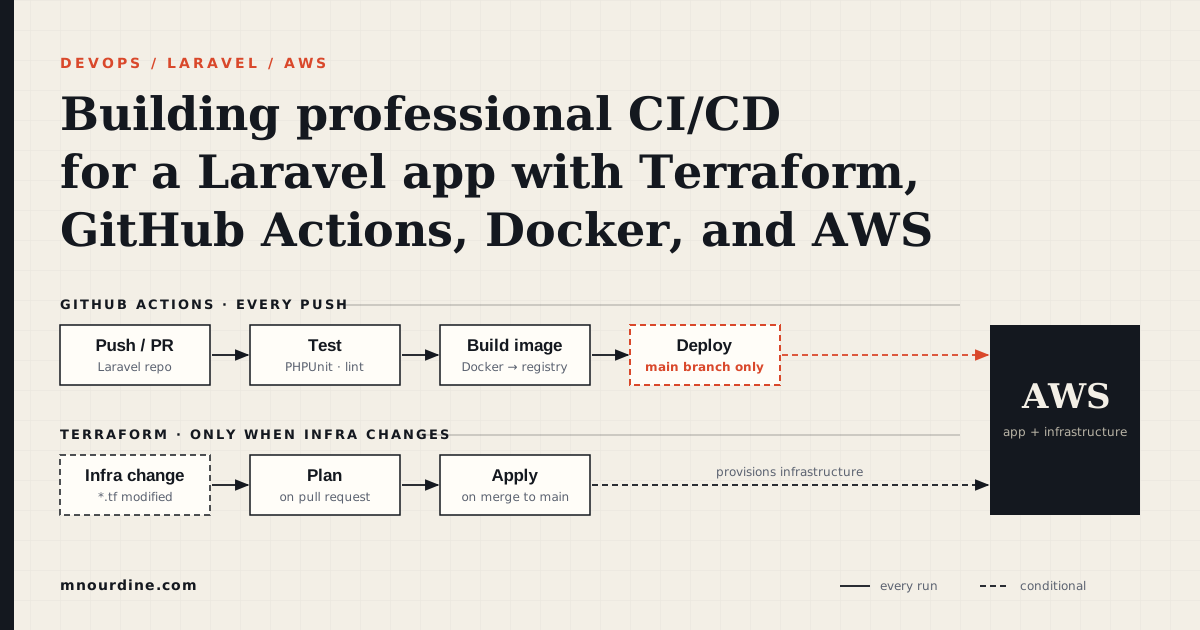
The infrastructure deployment workflow is now complete end-to-end: a module change enters the pipeline as a PR, passes static analysis and integration tests, gets tagged with a semantic version, and flows through dev → staging → production with explicit validation at each environment and human approval before the final apply.
The two workflows — application code (Day 20) and infrastructure code (Day 21) — operate independently but share the same discipline: nothing reaches production without passing tests, and every change to production requires a human to read the plan.
What the workflow still depends on is a solid module foundation. The networking module — VPC, public subnets, private subnets, NAT Gateway — is the next piece to build. Every other module in the stack (alb, asg, rds) takes networking outputs as inputs. Once it is built and versioned, the full module dependency chain can be expressed as run triggers in HCP Terraform.
This post is part of a 30-day Terraform learning journey.
💬 Comments
No comments yet. Be the first to share your thoughts!
Leave a Comment