
Why IaC Adoption Fails
IaC adoption rarely fails because of Terraform. It fails because teams treat it as a one-time migration — attempt to convert all existing infrastructure at once, hit friction midway, and end up with half the infrastructure in Terraform and half still managed by hand. That hybrid state is harder to reason about than either extreme.
The pattern that works is incremental: start with new resources only, prove the model, then expand. Existing infrastructure stays as-is until there is time to do the migration properly with terraform import.
Three things typically block adoption, and each has a specific fix:
Perceived risk — "What if Terraform deletes something?" This is addressed by showing the plan before every apply, using prevent_destroy on critical resources, and starting with non-production environments. Engineers who see terraform plan output a handful of times stop worrying about surprise deletions.
Learning curve — HCL, provider schemas, state management. This is addressed by pair programming on the first few modules and committing the team's conventions to a CONTRIBUTING.md before onboarding the second engineer. Standards written after the second engineer joins are always compromises.
Tooling friction — managing the state backend, rotating credentials, coordinating who is allowed to run terraform apply. This is where HCP Terraform provides the most leverage.
Stage 1: The Foundation (Individual Practice)
Days 1–18 covered this. One engineer. One AWS account. S3 + DynamoDB for state. CI applying on merge. The output of this stage is not just working Terraform code — it is a set of decisions that become the team's defaults:
- Module boundaries:
networking,alb,asg,rds,iamas separate concerns - Naming convention:
${var.environment}-${var.app_name}-resource-type - Tagging strategy:
Environment,Project,ManagedBy = terraformon every resource - Environment model: Separate root configs with separate state files — not CLI workspaces — for long-lived
dev,staging, andprod - Testing baseline:
terraform validate,tflint,checkov, and Terratest as the minimum bar for a module to be shared
The reason environment separation matters: when dev and prod are separate root configs with separate backends, destroying dev is a single terraform destroy with zero risk of touching prod state. When they share a backend via CLI workspaces, the blast radius is harder to reason about.
Stage 2: When a Second Engineer Joins
Three problems emerge within the first week:
State conflicts. DynamoDB locking prevents concurrent applies on the same workspace, but it does not prevent an engineer from applying locally against a state that CI already modified an hour ago. The rule: only CI runs terraform apply against shared environments. Engineers apply locally only in sandboxes they own.
Credentials. The path of least resistance is giving every engineer AdministratorAccess IAM credentials. The better path is what Day 16 established — CI uses an OIDC role with exactly the permissions it needs. Engineers get read-only credentials for local terraform plan, nothing more. They can see what would change but cannot apply it.
Drift from convention. Without enforcement, engineers use different formatting, different variable naming, and skip terraform fmt. The CI pipeline is the enforcement mechanism: fmt -check, validate, tflint, checkov, and terraform plan all run on every PR before anything can merge. The plan output is posted as a PR comment so reviewers see the exact AWS change they are approving.
The repository structure that makes this work
terraform-repo/
├── CONTRIBUTING.md           ← conventions, review checklist, how to add a new environment
├── .tflint.hcl               ← shared lint ruleset
├── .terraform.lock.hcl       ← committed provider version pin
├── modules/
│   ├── networking/
│   ├── alb/
│   ├── asg/
│   └── rds/
├── environments/
│   ├── dev/
│   │   ├── main.tf
│   │   ├── backend.tf
│   │   └── terraform.tfvars
│   └── prod/
│       ├── main.tf
│       ├── backend.tf
│       └── terraform.tfvars
└── .github/
    └── workflows/
        └── terraform.yml
Each environment directory is a fully independent root config. It has its own backend.tf pointing to its own S3 key, its own CI role, and its own state. Sharing only happens through module references.
Stage 3: HCP Terraform
HCP Terraform (formerly Terraform Cloud) is HashiCorp's managed SaaS platform for the pieces that every team has to build themselves at Stage 2: the remote backend, credential management, run serialization, and access control. Terraform Enterprise is the self-hosted version of the same product — identical features, deployed inside your own infrastructure, for organizations with compliance requirements that prevent using SaaS.
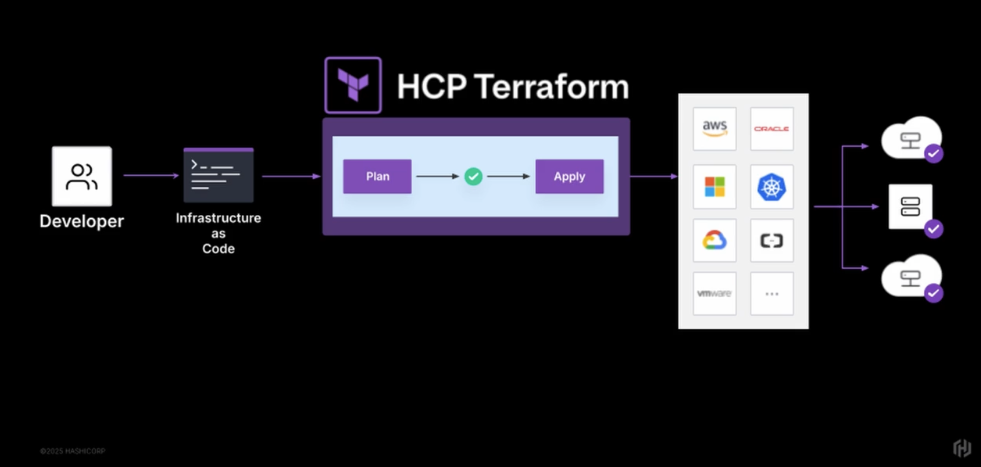
For the purposes of this post, everything about HCP Terraform applies equally to Terraform Enterprise.
The question is not "is HCP Terraform better than S3 + DynamoDB + GitHub Actions?" It is "which problems are you willing to own yourself?"
| Concern | S3 + DynamoDB + CI | HCP Terraform |
|---|---|---|
| State storage | S3 bucket you manage | Managed, versioned, encrypted |
| State locking | DynamoDB table you provision | Built-in |
| Remote plan/apply | CI runner (GitHub Actions) | HCP Terraform's managed environment |
| Credential distribution | CI secrets or OIDC role | Workspace variables, encrypted at rest |
| Access control | IAM + CI role permissions | Team-based RBAC per workspace |
| Run history and audit | CloudTrail + CI logs | Built-in, searchable |
| Policy enforcement | checkov in CI | Sentinel (plan-time policy evaluation) |
| Cost | AWS compute + storage costs | Free tier up to 500 resources |
The self-managed path gives you full control and no SaaS dependency. HCP Terraform gives you a purpose-built interface and eliminates operational overhead. Neither is wrong — it depends on whether your team has the capacity to maintain the platform, or whether that capacity is better spent on application infrastructure.
Connecting to HCP Terraform
The cloud block (Terraform 1.1+) is the current way to configure the HCP Terraform backend:
# backend.tf
terraform {
  cloud {
    organization = "mohamednourdine-org"

    workspaces {
      name = "fastapi-prod"
    }
  }
}
The older backend "remote" block does the same thing and is still valid, but the cloud block is preferred for new configurations — it supports workspace tags and additional HCP Terraform-specific features that the generic backend "remote" syntax does not expose.
Authenticate locally and migrate state:
terraform login          # opens browser, saves API token to ~/.terraform.d/credentials.tfrc.json
terraform init           # re-initializes, migrates S3 state to HCP Terraform workspace
After this, terraform plan and terraform apply run inside HCP Terraform's infrastructure, not on your machine. Your terminal is a client that streams the output — the actual run happens remotely.
How HCP Terraform Workspaces Work
HCP Terraform workspaces are fundamentally different from the CLI terraform workspace command. They share a name but are entirely separate concepts.
| CLI Workspaces | HCP Terraform Workspaces | |
|---|---|---|
| What they are | Multiple state files for one root config | Independent deployment units |
| Created with | terraform workspace new |
HCP Terraform UI or API |
| Config | Same .tf files, different terraform.workspace value |
Each workspace points to its own VCS branch or config |
| Variables | Passed via -var or .tfvars files |
Stored in the workspace, encrypted at rest |
| Access control | None — whoever has CLI access | Team-based RBAC per workspace |
| Run history | None | Full audit log of every plan and apply |
| Use case | Ephemeral test/sandbox environments | Long-lived environments: dev, staging, prod |
| Recommended for prod/staging separation | No | Yes |
A CLI workspace (terraform workspace new sandbox) creates an alternate state file for the same root config — same code, same backend, same AWS credentials. It is useful for throwaway sandboxes.
A HCP Terraform workspace is a complete deployment unit. It has:
- Its own state file, stored and versioned in HCP Terraform
- Its own set of Terraform variables and environment variables, encrypted at rest
- Its own run history — every plan and apply, with who triggered it and the full output
- Its own team permission settings
- Its own execution mode (remote, local, or agent)
The CLI command terraform workspace select has no effect on which HCP Terraform workspace is used. The workspace is determined entirely by the cloud block in the configuration.
For the FastAPI stack, the workspace model looks like this:
Organization: mohamednourdine-org
├── Workspace: fastapi-dev
│   ├── Terraform variables: environment=dev, instance_type=t2.micro, min_size=1
│   ├── Environment variables: AWS_ROLE_ARN=arn:aws:iam::DEV_ACCOUNT:role/TerraformRole
│   └── Auto-apply: enabled
│
├── Workspace: fastapi-staging
│   ├── Terraform variables: environment=staging, instance_type=t3.small, min_size=2
│   ├── Environment variables: AWS_ROLE_ARN=arn:aws:iam::STAGING_ACCOUNT:role/TerraformRole
│   └── Auto-apply: disabled (requires approval)
│
└── Workspace: fastapi-prod
    ├── Terraform variables: environment=prod, instance_type=t3.medium, min_size=3
    ├── Environment variables: AWS_ROLE_ARN=arn:aws:iam::PROD_ACCOUNT:role/TerraformRole
    └── Auto-apply: disabled (Sentinel policy must pass first)
Each workspace holds its own credentials — no shared secrets, no credential rotation across environments. The dev workspace role has no access to prod infrastructure at the IAM level.
Remote Execution Modes
HCP Terraform supports three execution modes per workspace:
| Mode | Where runs execute | AWS credentials live | Use case |
|---|---|---|---|
| Remote (default) | HCP Terraform managed environment | HCP Terraform workspace variables | Infrastructure reachable from the internet |
| Local | Your machine | Your local environment | State managed by HCP Terraform, runs locally |
| Agent | Self-hosted agent in your network | Agent's environment | Private VPCs, on-premises, air-gapped networks |
Remote is the standard choice. Your terminal streams the output but the process runs in HCP Terraform's environment — no AWS credentials on engineer laptops, no "it worked on my machine" inconsistencies.
Local mode is useful during migration: you get HCP Terraform state management and locking without needing to load credentials into HCP Terraform yet. A stepping stone, not a long-term setup.
Agent mode solves the private network problem. If the Kubernetes API server has no public endpoint, HCP Terraform's remote environment cannot reach it. An agent running inside the private VPC can — it pulls run instructions from HCP Terraform and executes them locally. This is also the right mode for the private networking module that is coming up, where EC2 instances live in subnets with no inbound internet access.
Variable Sets
When multiple workspaces share the same configuration — AWS credentials for all workspaces in an account, or a common set of Terraform defaults — HCP Terraform's variable sets avoid repetition:
Variable Set: aws-dev-credentials
  AWS_ACCESS_KEY_ID       = ...   (environment variable, sensitive)
  AWS_SECRET_ACCESS_KEY   = ...   (environment variable, sensitive)
  TF_VAR_aws_region       = us-east-1

Applied to: fastapi-dev, monitoring-dev, networking-dev
Any change to the variable set propagates automatically to every workspace it is applied to. Rotating a credential is a single operation rather than updating three separate workspaces.
Sentinel: Policy Enforcement Before Apply
Sentinel is HCP Terraform's policy-as-code layer. It runs between plan and apply, inspecting the plan output and blocking non-compliant applies before any AWS resources change.
terraform plan ──► Sentinel evaluates policies ──► terraform apply (if policies pass)
                              │
                     [PASS] or [FAIL or OVERRIDE]
A policy preventing unencrypted RDS instances from reaching production:
# policies/rds-encryption.sentinel
import "tfplan/v2" as tfplan

rds_instances = filter tfplan.resource_changes as _, resource {
    resource.type is "aws_db_instance" and
    resource.change.actions contains "create"
}

rds_must_be_encrypted = rule {
    all rds_instances as _, resource {
        resource.change.after.storage_encrypted is true
    }
}

main = rule { rds_must_be_encrypted }
Policies have three enforcement levels. Advisory logs a warning but does not block the apply — useful for visibility without enforcement while a team is transitioning. Soft Mandatory blocks the apply but allows an admin to override with a justification. Hard Mandatory blocks the apply with no override possible — for compliance requirements that cannot have exceptions.
The value of Sentinel over checkov in CI is timing and scope. checkov runs on the .tf files before planning — it catches static misconfigurations. Sentinel runs on the actual plan output after Terraform has resolved all references, evaluated all conditionals, and computed all resource changes. A storage_encrypted = var.enable_encryption where enable_encryption defaults to false will pass checkov (the attribute is set) but fail Sentinel when the plan shows the resolved value is false.
Team Access Control
HCP Terraform's permission model maps to real team structures:
Organization: mohamednourdine-org
│
├── Team: platform-engineers
│   └── Org permission: Manage Workspaces
│       (full access to all workspaces — create, delete, configure)
│
├── Team: developers
│   └── Workspace permission on fastapi-dev: Write
│   └── Workspace permission on fastapi-prod: Read
│       (developers can apply to dev, read-only on prod)
│
└── Team: security
    └── Workspace permission on all workspaces: Read
    └── Org permission: Manage Policies
        (can create and update Sentinel policies)
Workspace-level permissions have four levels:
| Permission | Trigger plan | Trigger apply | Download state | Manage variables |
|---|---|---|---|---|
| Read | ✗ | ✗ | ✗ | ✗ |
| Plan | ✓ | ✗ | ✗ | ✗ |
| Write | ✓ | ✓ | ✓ | ✓ |
| Admin | ✓ | ✓ | ✓ | ✓ + workspace settings |
The Plan permission is the key one for most teams. Developers can trigger a plan against prod and see exactly what would change — without the ability to apply it. The output is visible in the HCP Terraform UI with a full explanation of every resource change, which is more readable than a raw CI log.
The Incremental Adoption Sequence
Putting it all together, a practical four-month path for a team starting from manual AWS console management:
Month 1 — New resources only, no migration. New resources go through Terraform. Existing resources stay as-is. Set up the shared S3 backend, write the first module, add CI on a green-field project (a new S3 bucket or security group). Engineers get comfortable with the plan → review → apply workflow without touching anything production-critical.
Month 2 — Migrate dev and staging.
Use terraform import to bring existing dev/staging resources under Terraform management. The goal is a clean terraform plan showing zero changes — the state matches the real infrastructure. Do not move to the next step until the plan is clean.
# Import existing resources without recreating them
terraform import aws_security_group.web sg-0abc1234567890abc
terraform import aws_lb.main arn:aws:elasticloadbalancing:us-east-1:...

# Verify: plan should show no changes
terraform plan  # → No changes. Infrastructure is up-to-date.
Month 3 — Production migration and HCP Terraform. Migrate prod state from S3 to HCP Terraform workspaces. Move AWS credentials from CI secrets to HCP Terraform variable sets. Enable the prod workspace's Sentinel policies. Keep auto-apply off — all prod applies require manual approval from a second engineer.
Month 4 — Full automation.
Connect workspaces to the VCS (GitHub). Every merge to main triggers a run in the dev workspace (auto-apply on). Staging and prod remain manually approved. Add workspace notifications: a Slack message when a prod apply completes or fails. At this point, the infrastructure workflow is as auditable and reproducible as the application deployment workflow.
Key Terms
| Term | Definition |
|---|---|
| HCP Terraform | HashiCorp's managed SaaS platform for Terraform (formerly Terraform Cloud) |
| Terraform Enterprise | Self-hosted version of HCP Terraform — same features, your own infrastructure |
cloud block |
Modern HCL syntax (Terraform 1.1+) for connecting a config to HCP Terraform |
backend "remote" |
Legacy syntax for the same purpose — valid but cloud block is preferred |
| Remote execution | Plans and applies run in HCP Terraform's environment, not locally |
| Local execution mode | Plans and applies run locally; HCP Terraform stores state only |
| Agent execution mode | Plans and applies run on a self-hosted agent in a private network |
| HCP Terraform workspace | Independent deployment unit with its own state, variables, runs, and permissions |
| CLI workspace | Alternate state file for the same root config — different concept, same name |
| Variable Set | Shared group of variables applied to multiple workspaces |
| Sentinel | HashiCorp's policy-as-code language — evaluates the plan before apply |
| Advisory | Sentinel enforcement level: logs a warning, does not block |
| Soft Mandatory | Sentinel enforcement level: blocks apply, admin can override |
| Hard Mandatory | Sentinel enforcement level: blocks apply, no override possible |
Where I Am At
The FastAPI stack has always been a one-person project in a one-person account. Day 19's shift is recognizing that the decisions made throughout Days 1–18 — module boundaries, naming conventions, the testing baseline, the CI apply workflow — are the same decisions a team needs to make, and they are much cheaper to make upfront than to retrofit later.
HCP Terraform is not a requirement for team-scale Terraform. The S3 + DynamoDB + GitHub Actions setup from earlier in this series covers the core use case. What HCP Terraform adds is an audit trail, workspace-level credential isolation, Sentinel policy enforcement, and a team permission model that does not require custom IAM engineering. For a small team, the free tier covers all of it.
The stack is now production-grade in every technical dimension. The remaining gap from Day 16 — private networking with proper VPC architecture — is the next module to build.
This post is part of a 30-day Terraform learning journey.
💬 Comments
No comments yet. Be the first to share your thoughts!
Leave a Comment