
Production-grade is not a vague aspiration — it is a checklist. Chapter 8 of Terraform: Up & Running defines it as a set of concrete requirements that infrastructure must meet before it can be trusted with real users, real data, and real incidents. Most teams skip half the list and discover the gaps at the worst possible time.
After Days 9–15, the FastAPI stack covers a lot of it. Let's audit what is done, what is missing, and how to close each gap.
The Production-Grade Checklist Audit
| Requirement | Status | Notes |
|---|---|---|
| Automated, repeatable deployment | YES | terraform apply from any machine |
| Parameterized configuration | YES | map(object) env config, no hardcoding |
| Zero-downtime deployments | YES | Instance refresh (Day 12) |
| High availability | YES | Multi-AZ ASG, min_size ≥ 2 in prod |
| Auto-scaling | YES | ASG with max_size > min_size |
| Secrets management | YES | AWS Secrets Manager + IAM role (Day 13) |
| Encryption at rest | YES | S3 state bucket (AES256), RDS encrypted |
| Health checks | YES | ALB + ASG ELB health checks, /health endpoint |
| CloudWatch monitoring | YES | CPU alarm in prod (Day 10) |
| Centralized logging | YES | CloudWatch Log Group (Day 11) |
| Multi-region | YES | Provider aliases (Day 14) |
| Module versioning | YES | Semantic tags on GitHub (Day 9) |
| State locking | YES | DynamoDB + S3 backend (Day 5) |
| Alerting | PARTIALLY | Alarm exists but no SNS notification wired up |
| Network isolation | PARTIALLY | Using default VPC — not private subnets |
| Automated testing | NO | No tests exist for the module |
| CI/CD pipeline | NO | terraform apply is manual |
| Module documentation | NO | No READMEs or auto-generated docs |
| Cost controls | NO | No budget alerts or right-sizing analysis |
The YES items are real. The three red ones are what distinguish "works on my machine" from production-grade. This post addresses all three.
A YES means the requirement is met and exercised regularly. PARTIALLY means the mechanism exists but is incomplete (an alarm with nowhere to send notifications is not alerting). NO means the gap is unaddressed today.
Gap 1: CI/CD Pipeline
Without this: two engineers running terraform apply from different laptops can overwrite each other's changes, and there is no audit trail of who applied what and when.
Running terraform apply manually is fine for learning. In a team, it is a coordination problem — two engineers can apply conflicting changes if they are both working from different local states, and there is no record of who applied what and when.
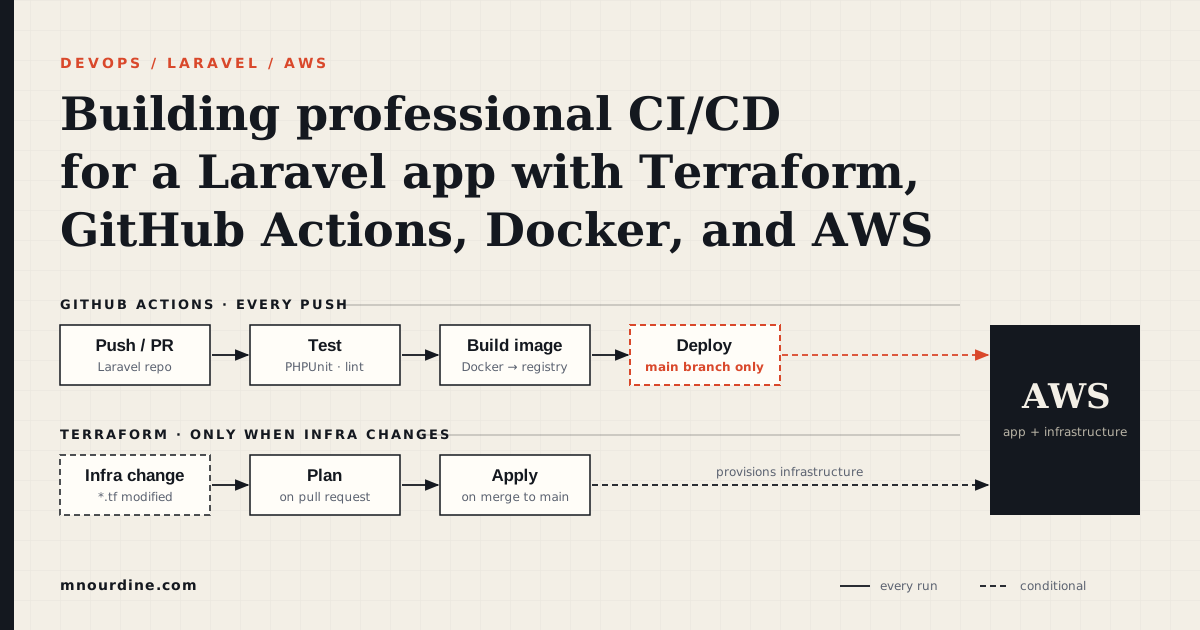
The standard pattern:
- On pull request: run
terraform planand post the output as a PR comment. The reviewer sees exactly what will change before approving. - On merge to main: run
terraform applyautomatically.
GitHub Actions workflow
Create .github/workflows/terraform.yml in the infrastructure repo:
name: Terraform

on:
  push:
    branches: [main]
  pull_request:
    branches: [main]

env:
  TF_VERSION: "1.14.9"
  AWS_REGION: "us-east-1"

permissions:
  id-token: write      # required for OIDC auth to AWS
  contents: read
  pull-requests: write # required to post plan output as a PR comment

jobs:
  terraform:
    runs-on: ubuntu-latest

    steps:
      - uses: actions/checkout@v4

      - name: Configure AWS credentials (OIDC)
        uses: aws-actions/configure-aws-credentials@v4
        with:
          role-to-assume: arn:aws:iam::${{ secrets.AWS_ACCOUNT_ID }}:role/GitHubActionsRole
          aws-region: ${{ env.AWS_REGION }}

      - name: Set up Terraform
        uses: hashicorp/setup-terraform@v3
        with:
          terraform_version: ${{ env.TF_VERSION }}

      - name: Terraform Init
        run: terraform init
        working-directory: prod/

      - name: Terraform Format Check
        run: terraform fmt -check -recursive
        working-directory: prod/

      - name: Terraform Validate
        run: terraform validate
        working-directory: prod/

      - name: Terraform Plan
        id: plan
        run: terraform plan -no-color -out=tfplan
        working-directory: prod/
        continue-on-error: true   # post the comment even if plan fails

      - name: Post plan to PR
        if: github.event_name == 'pull_request'
        uses: actions/github-script@v7
        with:
          script: |
            const output = `#### Terraform Plan
            \`\`\`
            ${{ steps.plan.outputs.stdout }}
            \`\`\`
            *Pushed by @${{ github.actor }}, Action: \`${{ github.event_name }}\`*`;
            github.rest.issues.createComment({
              issue_number: context.issue.number,
              owner: context.repo.owner,
              repo: context.repo.repo,
              body: output
            });

      - name: Terraform Apply
        if: github.ref == 'refs/heads/main' && github.event_name == 'push'
        run: terraform apply -auto-approve tfplan
        working-directory: prod/
What this workflow does, in English. On every PR, the workflow checks formatting, validates syntax, runs plan, and posts the plan as a comment so the reviewer sees the exact diff before approving. On merge to main, it runs apply automatically. No one ever runs terraform apply from a laptop again.
Before vs. after, in commands:
- Before:
cd prod && terraform apply— runs on your laptop, uses your credentials, leaves no record. - After:
git push— CI runsplan, you review the diff in the PR, merge, CI runsapply, the run is logged in GitHub Actions forever.
The OIDC auth detail
OIDC, in plain English. A way for GitHub to prove its identity to AWS so AWS hands it a short-lived credential for that one workflow run — instead of GitHub holding a permanent access key that could leak.
The workflow uses OIDC (OpenID Connect) instead of long-lived AWS access keys stored as GitHub secrets. OIDC issues a short-lived token for each workflow run — no static credentials to leak or rotate.
To set it up, create an IAM role with a trust policy that allows the specific GitHub repo to assume it:
data "aws_iam_policy_document" "github_actions_trust" {
  statement {
    actions = ["sts:AssumeRoleWithWebIdentity"]

    principals {
      type        = "Federated"
      identifiers = [aws_iam_openid_connect_provider.github.arn]
    }

    condition {
      test     = "StringLike"
      variable = "token.actions.githubusercontent.com:sub"
      # Only the specific repo can assume this role — not any GitHub repo
      values   = ["repo:mohamednourdine/terraform-infra:*"]
    }
  }
}

resource "aws_iam_role" "github_actions" {
  name               = "GitHubActionsRole"
  assume_role_policy = data.aws_iam_policy_document.github_actions_trust.json
}
Gap 2: Automated Testing with Terratest
Without this: you discover that a module is broken when it fails in production, not when the change is proposed.
Terratest is a Go library that tests Terraform modules by actually deploying them, running assertions, and tearing them down. It is the standard for module testing in the Terraform ecosystem.
How to read the test below. It deploys the module to a real AWS account, waits for the ALB health check to pass, asserts a 200 response, then tears everything down — even if the test fails. The defer terraform.Destroy line is the safety net that prevents orphaned resources when an assertion blows up.
A test for the web-app module:
// test/web_app_test.go
package test

import (
    "fmt"
    "net/http"
    "testing"
    "time"

    "github.com/gruntwork-io/terratest/modules/terraform"
    "github.com/stretchr/testify/assert"
    "github.com/stretchr/testify/require"
)

func TestWebAppModule(t *testing.T) {
    t.Parallel()

    terraformOptions := &terraform.Options{
        // Path to the module to test
        TerraformDir: "../modules/web-app",

        Vars: map[string]interface{}{
            "environment":               "test",
            "instance_type":             "t2.micro",
            "min_size":                  1,
            "max_size":                  2,
            "server_port":               8000,
            "health_check_path":         "/health",
            "health_check_grace_period": 120,
            "user_data":                 testUserData(),
        },

        // Prevent colour codes from cluttering test output
        NoColor: true,
    }

    // Destroy everything at the end of the test — even if the test fails
    defer terraform.Destroy(t, terraformOptions)

    // Deploy the module
    terraform.InitAndApply(t, terraformOptions)

    // Get the ALB DNS name from outputs
    albDNS := terraform.Output(t, terraformOptions, "alb_dns_name")
    url := fmt.Sprintf("http://%s/health", albDNS)

    // The ALB needs time to finish health checks after apply
    // Retry the request every 10 seconds for up to 5 minutes
    maxRetries := 30
    sleepBetween := 10 * time.Second

    for i := 0; i < maxRetries; i++ {
        resp, err := http.Get(url)
        if err == nil && resp.StatusCode == 200 {
            // Health check passed — run assertions
            assert.Equal(t, 200, resp.StatusCode)
            return
        }
        t.Logf("Attempt %d/%d: %v — retrying in %s", i+1, maxRetries, err, sleepBetween)
        time.Sleep(sleepBetween)
    }

    require.Fail(t, "Health check never returned 200 after 5 minutes")
}

func testUserData() string {
    return `#!/bin/bash
set -e
yum install -y python3 python3-pip
pip3 install fastapi "uvicorn[standard]"
mkdir -p /opt/api
cat > /opt/api/main.py << 'EOF'
from fastapi import FastAPI
import socket, datetime
app = FastAPI()
@app.get("/health")
def health():
    return {"status": "healthy", "hostname": socket.gethostname(),
            "timestamp": datetime.datetime.utcnow().isoformat() + "Z"}
EOF
nohup uvicorn main:app --host 0.0.0.0 --port 8000 --app-dir /opt/api &`
}
Run the test:
# Tests deploy real AWS resources — they take 5–10 minutes and incur cost
go test -v -timeout 20m ./test/
What Terratest catches
- Module outputs are correct (ALB DNS name is a valid hostname)
- The deployed app actually responds to health checks
- Security group rules are correct (the ALB can reach the instances)
- The
create_before_destroylifecycle doesn't leave orphaned resources
These are things terraform validate and terraform plan cannot check — they only validate syntax and configuration. Terratest validates behaviour.
Keeping test costs down
Real infrastructure tests cost real money. Two practices keep this manageable:
- Use
t2.microin tests — the smallest instance that works. Tests don't need production-sized resources. - Always use
defer terraform.Destroy— resources are cleaned up even if the test panics ort.Fatalis called.
Gap 3: Module Documentation with terraform-docs
Without this: every consumer of the module has to read its source code to figure out the inputs, and the README drifts further from reality with every commit.
A module with no documentation is a module no one else can safely use. terraform-docs generates README content directly from the module's variables, outputs, and required providers — always in sync with the code.
Install:
brew install terraform-docs
Add a README.md to the module with special markers:
# web-app module

Deploys a FastAPI application on EC2 behind an Application Load Balancer,
managed by an Auto Scaling Group with rolling update support.

## Usage

```hcl
module "web_app" {
  source = "git::https://github.com/mohamednourdine/terraform-modules.git//modules/web-app?ref=v1.4.0"

  environment   = "prod"
  instance_type = "t3.small"
  min_size      = 2
  max_size      = 6
  user_data     = file("user_data.sh")
}
```

<!-- BEGIN_TF_DOCS -->
<!-- END_TF_DOCS -->
Generate and inject the docs:
terraform-docs markdown table --output-file README.md modules/web-app/
This replaces everything between the markers with a generated table of all inputs and outputs:
## Inputs

| Name | Description | Type | Default | Required |
|------|-------------|------|---------|----------|
| environment | Deployment environment | `string` | n/a | yes |
| instance_type | EC2 instance type | `string` | `"t2.micro"` | no |
| min_size | Minimum ASG instance count | `number` | `1` | no |
| max_size | Maximum ASG instance count | `number` | `2` | no |
| server_port | Port the app listens on | `number` | `8000` | no |
| health_check_path | ALB health check path | `string` | `"/health"` | no |
| user_data | Instance startup script | `string` | n/a | yes |

## Outputs

| Name | Description |
|------|-------------|
| alb_dns_name | DNS name of the Application Load Balancer |
| alb_zone_id | Hosted zone ID — required for Route 53 alias records |
| asg_name | Name of the Auto Scaling Group |
Add a terraform-docs step to CI so the README is always current:
- name: Check module docs are up to date
  run: |
    terraform-docs markdown table --output-file README.md modules/web-app/
    git diff --exit-code   # fails if the generated docs differ from what's committed
A PR that changes variables.tf without regenerating the README will fail CI.
Module Composability — The Design Principle
The modules built over the past week have grown in scope. The web-app module now handles security groups, the launch template, the ASG, the ALB, CloudWatch alarms, and log groups. That is too much for one module.
Production-grade modules follow the single responsibility principle: each module does one well-defined thing and exposes clean outputs for the next module to consume.
How to read the tree below. Read it top-down. Each module's outputs (listed beneath it) become the inputs to the modules underneath. networking produces a VPC; security-groups consumes it; alb and asg consume both. Nothing reaches sideways — every dependency is explicit and flows down.
The right decomposition for the FastAPI stack:
modules/
├── networking/          # VPC, subnets, route tables, internet gateway
│   └── outputs: vpc_id, public_subnet_ids, private_subnet_ids
│
├── security-groups/     # All security groups for the stack
│   └── outputs: alb_sg_id, instance_sg_id, rds_sg_id
│
├── alb/                 # ALB, target group, listener
│   └── outputs: alb_dns_name, alb_zone_id, target_group_arn
│
├── asg/                 # Launch template + ASG (no ALB logic)
│   └── outputs: asg_name, asg_arn
│
├── rds/                 # RDS instance, subnet group, parameter group
│   └── outputs: endpoint, port
│
└── iam/                 # Instance role, profile, policy
    └── outputs: instance_profile_name, role_arn
Each module is independently versioned, independently testable, and independently replaceable. The root config wires them together:
module "networking" {
  source      = "git::https://github.com/mohamednourdine/terraform-modules.git//modules/networking?ref=v1.0.0"
  environment = var.environment
}

module "security_groups" {
  source      = "git::https://github.com/mohamednourdine/terraform-modules.git//modules/security-groups?ref=v1.0.0"
  environment = var.environment
  vpc_id      = module.networking.vpc_id
}

module "alb" {
  source            = "git::https://github.com/mohamednourdine/terraform-modules.git//modules/alb?ref=v1.0.0"
  environment       = var.environment
  vpc_id            = module.networking.vpc_id
  subnet_ids        = module.networking.public_subnet_ids
  security_group_id = module.security_groups.alb_sg_id
}

module "asg" {
  source            = "git::https://github.com/mohamednourdine/terraform-modules.git//modules/asg?ref=v1.0.0"
  environment       = var.environment
  subnet_ids        = module.networking.private_subnet_ids
  security_group_id = module.security_groups.instance_sg_id
  target_group_arn  = module.alb.target_group_arn
  instance_type     = var.instance_type
  min_size          = var.min_size
  max_size          = var.max_size
  user_data         = local.fastapi_user_data
}
The outputs of one module become the inputs of the next. No module knows about the internals of any other — only its declared outputs.
Why this matters for testing
A monolithic web-app module requires a full stack to test. A decomposed alb module can be tested in isolation — just an ALB and a target group, no EC2, no ASG, no RDS. The test is faster, cheaper, and simpler to reason about.
The Remaining Gap: Private Networking
The current setup uses the AWS default VPC with default public subnets. This means EC2 instances have public IP addresses and are directly reachable from the internet (modulo security group rules). That is not acceptable for production.
The proper network layout:
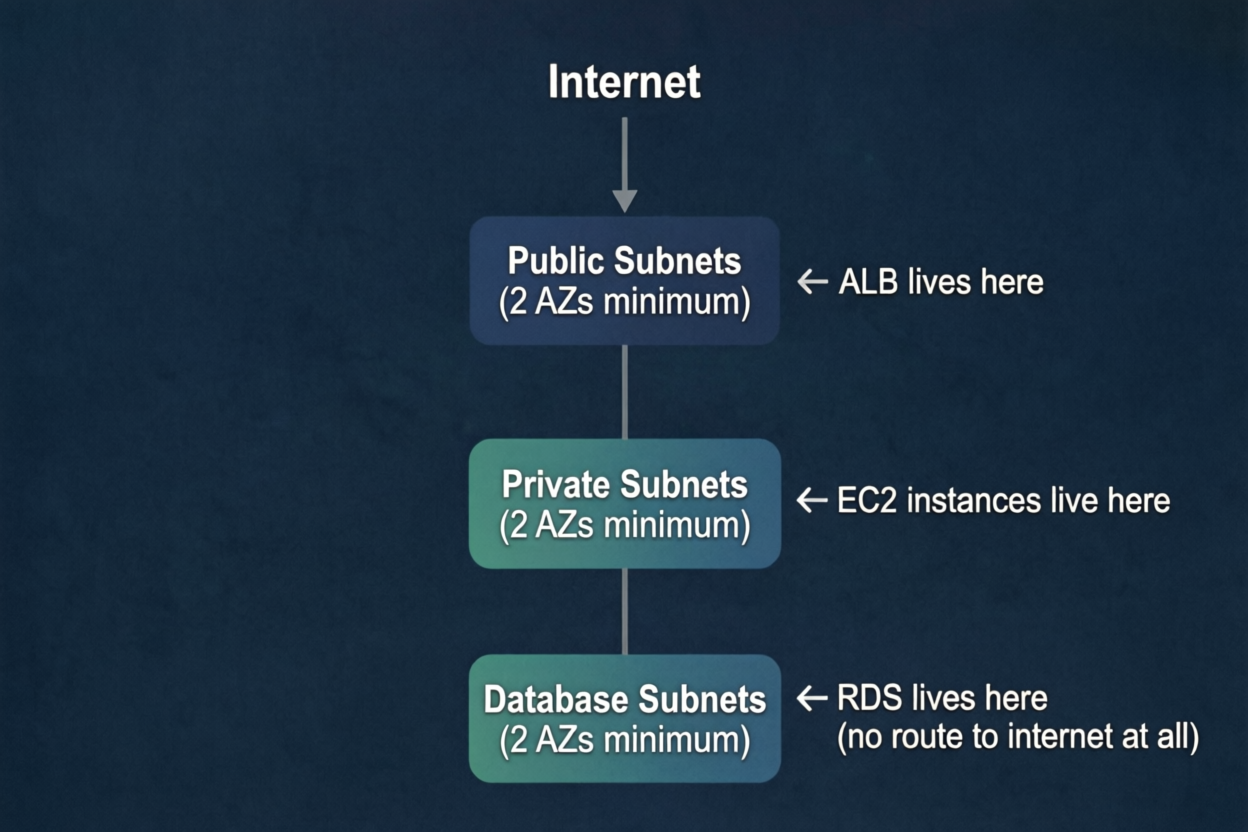
EC2 instances in private subnets still need outbound internet access to pull packages and call AWS APIs (Secrets Manager, CloudWatch). That goes through a NAT Gateway in the public subnet — outbound only, no inbound from the internet.
NAT Gateway, in plain English. A managed AWS service that lets private instances reach the internet outbound (for
yum install, AWS API calls) but blocks all unsolicited inbound traffic from the internet. Think of it as a one-way door.
This networking module is the foundation that all the others build on. It is the piece that converts the setup from "works in a default VPC" to "production network architecture." Day 17 covers this in detail.
Revised Checklist After Today
| Requirement | Before Day 16 | After Day 16 |
|---|---|---|
| Automated testing | NO | YES — Terratest validates deployed behaviour |
| CI/CD pipeline | NO | YES — GitHub Actions: plan on PR, apply on merge |
| Module documentation | NO | YES — terraform-docs, enforced in CI |
| Alerting | PARTIALLY — alarm, no notification | Still PARTIALLY — SNS topic needed |
| Network isolation | PARTIALLY — default VPC | Still PARTIALLY — VPC module needed (Day 17) |
The infrastructure is now testable, automatically deployed, and self-documenting. These three things are what separate a module you can share with a team from one that only works because you know all the undocumented assumptions.
The production-grade checklist is not a one-time audit — it is a framework for evaluating every new piece of infrastructure before it goes live. The gaps that remain (private networking, SNS alerting) are real, known, and have a plan. That is a different situation from not knowing they exist.
Next up: building the VPC and private networking module that closes the network isolation gap.
If you only do one thing today, make it CI/CD. Tests and docs are easier to add later; an audit trail of every
applyis something you cannot reconstruct after the fact.
This post is part of a 30-day Terraform learning journey.
💬 Comments
No comments yet. Be the first to share your thoughts!
Leave a Comment