
After two weeks, the FastAPI deployment has covered a lot of ground: EC2 with user_data, an ASG behind an ALB, zero-downtime rolling updates, Secrets Manager for credentials, multi-region with provider aliases. The infrastructure is solid.
But there is a growing problem with the EC2 + user_data approach. Every time the application changes, a new launch template version is created, an instance refresh rolls out, and each new instance runs a startup script that installs Python, installs packages from the internet, and writes files to disk. If a PyPI mirror is slow, instances take 90 seconds to become healthy. If a package version changes under you, the script breaks silently.
The fix is to stop baking the application into the infrastructure at launch time and start shipping it as a container image instead. Build once, push to a registry, pull at runtime. The infrastructure stays static; only the image tag changes between deploys.
That means moving from EC2 to EKS — and from one provider (AWS) to two (AWS + Kubernetes).
Why Containers Change the Deployment Model
With EC2 + user_data, the instance is the deployment unit. To update the app, you update the launch template, trigger an instance refresh, and wait for new instances to boot and pass health checks.
With EKS, the deployment unit is a Pod — a container running your image. Updating the app means pushing a new image tag and updating a Kubernetes Deployment. Kubernetes replaces pods one at a time, the new ones pull the new image, and the old ones are terminated once the new ones are healthy. The EC2 nodes themselves don't change.
| Concern | EC2 + user_data | EKS + containers |
|---|---|---|
| App update | New launch template → instance refresh | New image tag → rolling pod replacement |
| Startup time | 60–120s (installs packages) | 5–15s (pulls pre-built image) |
| Environment parity | Depends on script idempotency | Identical image in all environments |
| Health checks | ALB health check on instance | Kubernetes liveness + readiness probes |
| Scaling | ASG adds/removes EC2 instances | HPA adds/removes pods (within node capacity) |
The Two-Provider Architecture
Provisioning EKS on AWS requires the AWS provider. Deploying applications onto EKS requires the Kubernetes provider. These are two separate plugins with separate configurations — but the Kubernetes provider's configuration depends on outputs from the AWS provider (the cluster endpoint and auth token).
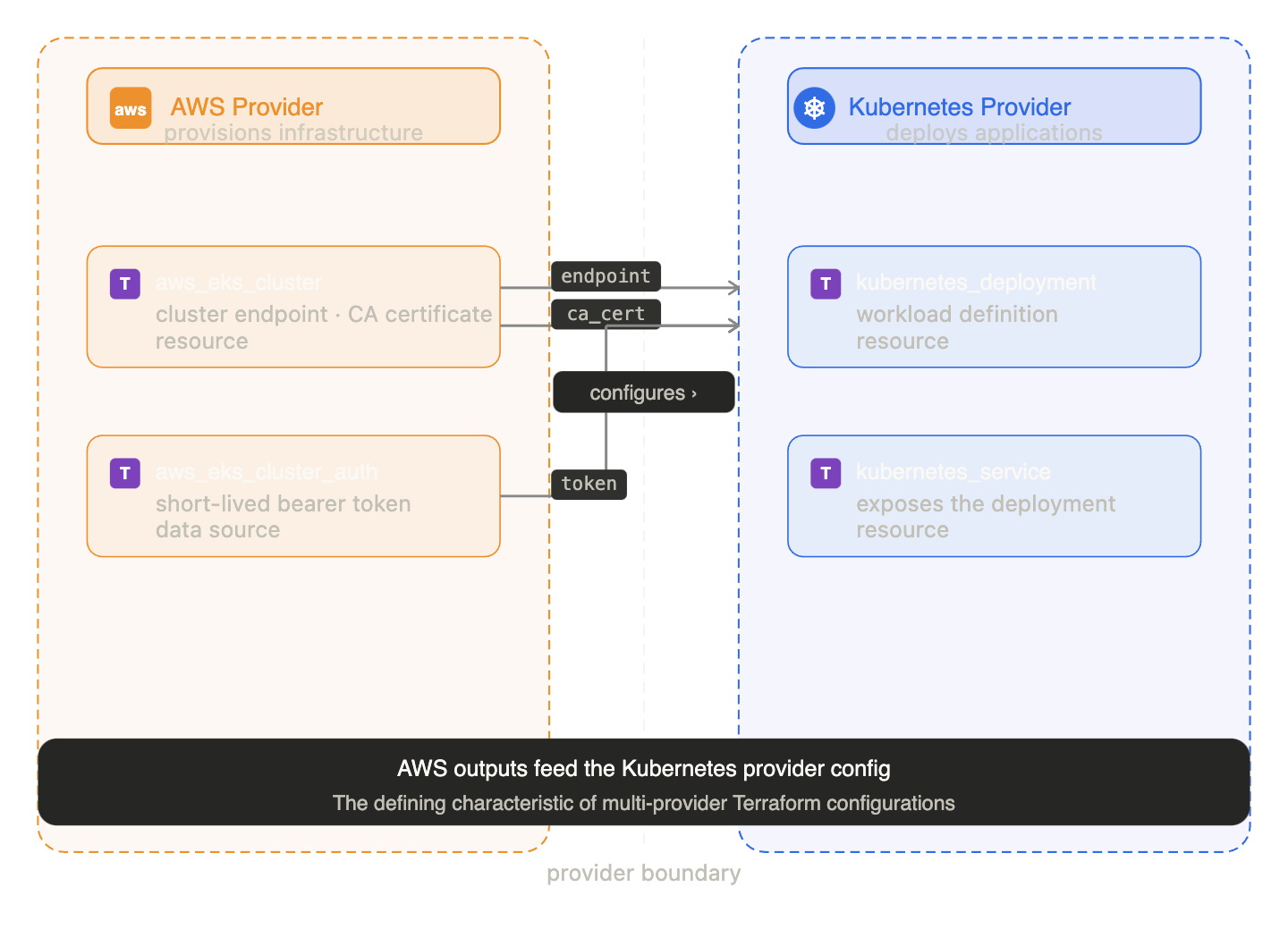
This dependency chain — AWS resources feeding configuration into the Kubernetes provider — is the defining characteristic of multi-provider Terraform configs.
Part 1: EKS Cluster with the AWS Provider
IAM roles (required by EKS)
EKS requires two IAM roles: one for the control plane, one for the worker nodes.
# ── Cluster role ─────────────────────────────────────────────────────────────

data "aws_iam_policy_document" "eks_assume_role" {
  statement {
    actions = ["sts:AssumeRole"]
    principals {
      type        = "Service"
      identifiers = ["eks.amazonaws.com"]
    }
  }
}

resource "aws_iam_role" "eks_cluster" {
  name               = "${local.name_prefix}-eks-cluster-role"
  assume_role_policy = data.aws_iam_policy_document.eks_assume_role.json
  tags               = local.all_tags
}

resource "aws_iam_role_policy_attachment" "eks_cluster_policy" {
  role       = aws_iam_role.eks_cluster.name
  policy_arn = "arn:aws:iam::aws:policy/AmazonEKSClusterPolicy"
}

# ── Node role ─────────────────────────────────────────────────────────────────

data "aws_iam_policy_document" "node_assume_role" {
  statement {
    actions = ["sts:AssumeRole"]
    principals {
      type        = "Service"
      identifiers = ["ec2.amazonaws.com"]
    }
  }
}

resource "aws_iam_role" "eks_node" {
  name               = "${local.name_prefix}-eks-node-role"
  assume_role_policy = data.aws_iam_policy_document.node_assume_role.json
  tags               = local.all_tags
}

# Nodes need these three policies — no more, no less
resource "aws_iam_role_policy_attachment" "node_worker" {
  role       = aws_iam_role.eks_node.name
  policy_arn = "arn:aws:iam::aws:policy/AmazonEKSWorkerNodePolicy"
}

resource "aws_iam_role_policy_attachment" "node_cni" {
  role       = aws_iam_role.eks_node.name
  policy_arn = "arn:aws:iam::aws:policy/AmazonEKS_CNI_Policy"
}

resource "aws_iam_role_policy_attachment" "node_ecr" {
  role       = aws_iam_role.eks_node.name
  policy_arn = "arn:aws:iam::aws:policy/AmazonEC2ContainerRegistryReadOnly"
}
The EKS cluster and node group
data "aws_subnets" "default" {
  filter {
    name   = "vpc-id"
    values = [data.aws_vpc.default.id]
  }
}

resource "aws_eks_cluster" "main" {
  name     = "${local.name_prefix}-cluster"
  role_arn = aws_iam_role.eks_cluster.arn
  version  = "1.29"

  vpc_config {
    subnet_ids = data.aws_subnets.default.ids
  }

  # Cluster must wait for the policy attachment — otherwise it starts
  # before the role has the permissions it needs
  depends_on = [aws_iam_role_policy_attachment.eks_cluster_policy]

  tags = local.all_tags
}

resource "aws_eks_node_group" "main" {
  cluster_name    = aws_eks_cluster.main.name
  node_group_name = "${local.name_prefix}-nodes"
  node_role_arn   = aws_iam_role.eks_node.arn
  subnet_ids      = data.aws_subnets.default.ids

  instance_types = [var.instance_type]

  scaling_config {
    desired_size = var.min_size
    min_size     = var.min_size
    max_size     = var.max_size
  }

  update_config {
    # Maximum number of nodes that can be unavailable during a node group update.
    # With min_size = 2, this means one node is replaced at a time.
    max_unavailable = 1
  }

  depends_on = [
    aws_iam_role_policy_attachment.node_worker,
    aws_iam_role_policy_attachment.node_cni,
    aws_iam_role_policy_attachment.node_ecr,
  ]

  tags = local.all_tags
}
update_config on the node group is the EKS equivalent of the ASG instance refresh from Day 12 — rolling node replacement with a guaranteed minimum of healthy capacity.
Part 2: The Kubernetes Provider — Configured from EKS Outputs
Once the cluster exists, configure the Kubernetes provider using its endpoint, CA certificate, and an auth token fetched from AWS:
data "aws_eks_cluster_auth" "main" {
  name = aws_eks_cluster.main.name
}

provider "kubernetes" {
  host                   = aws_eks_cluster.main.endpoint
  cluster_ca_certificate = base64decode(aws_eks_cluster.main.certificate_authority[0].data)
  token                  = data.aws_eks_cluster_auth.main.token
}
The token is a short-lived credential issued by AWS STS — the same mechanism as the IAM role on EC2 instances in Day 13. The Kubernetes provider uses it to authenticate API calls to the EKS control plane.
The critical gotcha: two-phase apply
The Kubernetes provider configuration references aws_eks_cluster.main.endpoint — a value that doesn't exist until the cluster is created. Terraform evaluates provider configurations before planning resources, which means on the very first apply (when the cluster doesn't exist yet) the provider configuration fails.
The solution is to apply in two phases:
# Phase 1: create the EKS cluster and node group only
terraform apply -target=aws_eks_cluster.main -target=aws_eks_node_group.main

# Phase 2: now the cluster exists, configure kubectl and deploy the app
terraform apply
After phase 1, aws_eks_cluster.main.endpoint resolves to a real value. Phase 2 configures the Kubernetes provider and deploys the application resources.
This two-phase pattern is a known limitation of the Terraform + EKS combination. Teams that hit this often switch to using separate state files — one for the cluster infrastructure, one for the application deployments — so the cluster is always pre-existing from the application config's perspective.
Part 3: Deploying the FastAPI App as a Kubernetes Workload
With the Kubernetes provider configured, deploy the FastAPI app using native Kubernetes resources.
resource "kubernetes_deployment" "fastapi" {
  metadata {
    name      = "fastapi"
    namespace = "default"
    labels    = { app = "fastapi" }
  }

  spec {
    replicas = var.min_size

    selector {
      match_labels = { app = "fastapi" }
    }

    template {
      metadata {
        labels = { app = "fastapi" }
      }

      spec {
        container {
          name  = "fastapi"
          image = "${var.container_image}:${var.image_tag}"

          port {
            container_port = 8000
          }

          # Non-secret config as env vars — same pattern as Day 13
          env {
            name  = "SECRET_NAME"
            value = "fastapi/${var.environment}/db-credentials"
          }

          env {
            name  = "AWS_REGION"
            value = data.aws_region.current.name
          }

          # Readiness probe — pod receives traffic only after this passes
          readiness_probe {
            http_get {
              path = "/health"
              port = 8000
            }
            initial_delay_seconds = 10
            period_seconds        = 5
            failure_threshold     = 3
          }

          # Liveness probe — pod is restarted if this fails
          liveness_probe {
            http_get {
              path = "/health"
              port = 8000
            }
            initial_delay_seconds = 30
            period_seconds        = 10
            failure_threshold     = 3
          }

          resources {
            requests = {
              cpu    = "100m"
              memory = "128Mi"
            }
            limits = {
              cpu    = "250m"
              memory = "256Mi"
            }
          }
        }
      }
    }
  }
}
The two probes are the Kubernetes equivalent of the ALB health check:
- Readiness: controls when the pod starts receiving traffic. A pod that passes liveness but not readiness keeps running but is removed from the load balancer.
- Liveness: controls whether the pod is healthy enough to stay running. A pod that fails liveness is killed and replaced.
Kubernetes Service — NLB via LoadBalancer type
resource "kubernetes_service" "fastapi" {
  metadata {
    name      = "fastapi"
    namespace = "default"
    annotations = {
      # AWS-specific: provision an NLB instead of a Classic ELB
      "service.beta.kubernetes.io/aws-load-balancer-type" = "nlb"
    }
  }

  spec {
    selector = { app = "fastapi" }
    type     = "LoadBalancer"

    port {
      port        = 80
      target_port = 8000
      protocol    = "TCP"
    }
  }
}

output "service_hostname" {
  value       = kubernetes_service.fastapi.status[0].load_balancer[0].ingress[0].hostname
  description = "DNS hostname of the Kubernetes LoadBalancer service"
}
When type = "LoadBalancer" is set on a Kubernetes Service running on EKS, AWS automatically provisions a load balancer and wires it up. The NLB annotation is the modern preference — faster, cheaper, and supports TCP-level health checks.
Part 4: Building a Multi-Provider Module
The EKS + Kubernetes setup above has two providers in the root config. A better pattern for teams is to encapsulate this in a module that declares both providers explicitly.
Module structure
modules/
└── eks-app/
    ├── versions.tf      ← declares both required providers
    ├── variables.tf
    ├── main.tf          ← EKS cluster + node group
    ├── kubernetes.tf    ← Deployment + Service
    └── outputs.tf
versions.tf — declare both providers
# modules/eks-app/versions.tf
terraform {
  required_providers {
    aws = {
      source  = "hashicorp/aws"
      version = "~> 5.0"
    }
    kubernetes = {
      source  = "hashicorp/kubernetes"
      version = "~> 2.0"
    }
  }
}
A module that uses multiple providers must declare all of them here. The calling config passes provider instances in via the providers argument:
# root/main.tf

provider "aws" {
  region = "us-east-1"
}

provider "kubernetes" {
  host                   = aws_eks_cluster.main.endpoint
  cluster_ca_certificate = base64decode(aws_eks_cluster.main.certificate_authority[0].data)
  token                  = data.aws_eks_cluster_auth.main.token
}

module "eks_app" {
  source = "git::https://github.com/mohamednourdine/terraform-modules.git//modules/eks-app?ref=v1.0.0"

  providers = {
    aws        = aws
    kubernetes = kubernetes
  }

  environment      = var.environment
  instance_type    = var.instance_type
  min_size         = var.min_size
  max_size         = var.max_size
  container_image  = "ghcr.io/mohamednourdine/fastapi-items"
  image_tag        = var.image_tag
}
The module is now reusable — a second module call with providers = { aws = aws.eu, kubernetes = kubernetes.eu } deploys the same stack to a second region, with the multi-region pattern from Day 14.
Part 5: Multi-Cloud — The Same Pattern on GCP
The Kubernetes provider is cloud-agnostic. Once you have a cluster endpoint, CA certificate, and token, the kubernetes_deployment and kubernetes_service resources work identically whether the cluster is on EKS (AWS), GKE (GCP), or AKS (Azure).
What changes is the cluster provisioning:
# AWS — EKS
resource "aws_eks_cluster" "main" { ... }
provider "kubernetes" {
  host  = aws_eks_cluster.main.endpoint
  token = data.aws_eks_cluster_auth.main.token
  # ...
}

# GCP — GKE (same Kubernetes resources after this)
resource "google_container_cluster" "main" {
  name     = "${local.name_prefix}-cluster"
  location = var.region
  # ...
}
provider "kubernetes" {
  host  = "https://${google_container_cluster.main.endpoint}"
  token = data.google_client_config.current.access_token
  # ...
}
The kubernetes_deployment and kubernetes_service blocks are identical. This is what multi-cloud actually looks like in practice — not the same HCL everywhere, but the same application layer on top of different cluster provisioning layers.
A Terraform module that takes only the kubernetes provider (not aws or google) can run on any cluster. The cluster provisioning is a separate concern, managed by a separate module.
Updating the App Without Changing Infrastructure
The key advantage of the container model: updating the FastAPI app is now just a variable change.
# One-time: authenticate to GitHub Container Registry.
# GHCR_PAT is a GitHub Personal Access Token with the write:packages scope.
echo $GHCR_PAT | docker login ghcr.io -u mohamednourdine --password-stdin

# Build and push the new image
docker build -t ghcr.io/mohamednourdine/fastapi-items:v2.0.0 .
docker push ghcr.io/mohamednourdine/fastapi-items:v2.0.0

# Update Terraform with the new image tag
terraform apply -var="image_tag=v2.0.0"
Terraform sees that image_tag changed, updates the kubernetes_deployment, and Kubernetes performs a rolling pod replacement — same result as the instance refresh from Day 12, but no EC2 instances are touched.
The EC2 nodes keep running. Only the pods change. Infrastructure and application are now properly separated.
Things to note from this article
Two-phase apply on first deploy. The Kubernetes provider can't be configured until the EKS cluster exists. Use -target to create the cluster first, then apply the rest. After the first apply, subsequent applies work normally.
kubernetes_service LoadBalancer hostname takes time. After terraform apply, the service_hostname output may be empty for 60–90 seconds while AWS provisions the NLB. Run terraform output again after the NLB is ready.
IAM roles must be attached before the cluster starts. The depends_on on aws_eks_cluster is not optional. EKS validates the role permissions at cluster creation time. Missing it causes a permissions error that looks unrelated to IAM.
Node group updates replace nodes. When instance_type changes, the node group replaces all nodes. Kubernetes reschedules pods automatically, but there is a brief period where pod capacity is reduced. Use max_unavailable = 1 and ensure desired_size >= 2 so there is always capacity during a node replacement.
Image tag latest defeats the purpose. If image_tag = "latest", Terraform never sees a change to the deployment when you push a new image — because the string "latest" doesn't change. Always use specific version tags (v2.0.0, a git SHA, a build number).
Final note
The FastAPI app is now running as a container on EKS. The infrastructure (cluster, nodes, IAM roles) is managed by the AWS provider. The application (Deployment, Service) is managed by the Kubernetes provider. They are two separate concerns in one Terraform config, connected by the cluster endpoint and auth token.
The multi-provider module pattern makes this composable: the same eks-app module can be called twice with different providers to run the same application in two regions, or once with a GKE provider to run it on GCP. The Kubernetes layer is portable; the cluster layer is not.
Tomorrow: Terraform testing — how to verify that modules behave correctly before shipping them.
This post is part of a 30-day Terraform learning journey.


💬 Comments
No comments yet. Be the first to share your thoughts!
Leave a Comment