
After Day 12, the FastAPI deployment is production-grade: zero-downtime rolling updates, environment-aware config, a versioned module. The next natural step is persistence. The in-memory item list resets every time an instance restarts — not acceptable for real data.
So: add an RDS PostgreSQL database. The app needs a hostname, a username, and a password to connect. Where do those values live?
The naive answer is a Terraform variable:
variable "db_password" {
  type = string
}
Then you pass it on the command line:
terraform apply -var="db_password=supersecret123"
This works. It also leaves your database password in at least four places you didn't intend.
Where Secrets Leak in Terraform
Understanding the attack surface is the first step. Here is every place a secret can appear when you use a plain variable:
1. The state file.
terraform.tfstate stores the current value of every resource attribute. If you pass db_password to aws_db_instance, the password is in state as plaintext JSON. Anyone who can read the S3 bucket — or who checks the file into git — has the password.
{
  "resources": [{
    "type": "aws_db_instance",
    "instances": [{
      "attributes": {
        "password": "supersecret123"
      }
    }]
  }]
}
2. terraform plan output.
Without the sensitive attribute, the value appears in plan output. Anyone watching the CI pipeline logs sees it.
3. user_data.
If you inject the password into the EC2 startup script, it appears in the EC2 console under Instance → Actions → View User Data. Base64 is encoding, not encryption — anyone with AWS console access can decode it immediately.
4. Shell history and CI logs.
-var="db_password=..." on the command line goes into your shell history. In CI, it appears in the job log if not properly masked.
Step 1: sensitive = true — The Minimum
Mark any variable that holds a secret as sensitive:
variable "db_password" {
  description = "RDS master password"
  type        = string
  sensitive   = true
}
This does one thing: masks the value in terraform plan and terraform apply output, replacing it with (sensitive value).
What it does not do:
- It does not encrypt the state file
- It does not prevent the value from being stored in state
- It does not stop you from accidentally logging it in a local
sensitive = true is the floor, not the ceiling. It is necessary and not sufficient.
You can also mark a local value as sensitive using the sensitive() function:
locals {
  db_url = sensitive(
    "postgresql://${var.db_user}:${var.db_password}@${aws_db_instance.main.endpoint}/app"
  )
}
Terraform will refuse to output local.db_url unless you explicitly mark the output sensitive = true as well.
Step 2: AWS Secrets Manager — The Right Approach
The correct pattern is to keep the secret outside Terraform entirely and have the application fetch it at runtime. Terraform never sees the raw value — it only provisions the infrastructure that has permission to access the secret.
Create the secret (one-time, via AWS CLI)
# Create the secret — do this manually, not in Terraform
aws secretsmanager create-secret \
  --name "fastapi/prod/db-credentials" \
  --description "RDS credentials for the FastAPI prod database" \
  --secret-string '{
    "username": "fastapi_user",
    "password": "Str0ng-R@ndom-P@ssword!",
    "dbname":   "fastapi_db"
  }' \
  --region us-east-1
Rotation can be configured in Secrets Manager independently of Terraform — the application keeps working because it fetches the current secret value on each connection, not at boot.
Reference the secret in Terraform
Use a data block to read the secret ARN. You reference metadata — not the value itself:
data "aws_secretsmanager_secret" "db" {
  name = "fastapi/${var.environment}/db-credentials"
}

# This data source fetches the current secret version.
# The raw value appears in Terraform state — see the note below.
data "aws_secretsmanager_secret_version" "db" {
  secret_id = data.aws_secretsmanager_secret.db.id
}
Pass the password to RDS by decoding the JSON from the secret:
locals {
  db_creds = jsondecode(data.aws_secretsmanager_secret_version.db.secret_string)
}

resource "aws_db_instance" "main" {
  identifier        = "${local.name_prefix}-db"
  engine            = "postgres"
  engine_version    = "15"
  instance_class    = var.db_instance_class   # e.g. "db.t3.micro" for dev, "db.t3.small" for prod
  allocated_storage = 20
  db_name           = local.db_creds["dbname"]
  username          = local.db_creds["username"]
  password          = local.db_creds["password"]

  db_subnet_group_name   = aws_db_subnet_group.main.name
  vpc_security_group_ids = [aws_security_group.rds.id]

  # Prevent accidental deletion in prod
  deletion_protection = local.is_production

  # Take a final snapshot before destroy
  final_snapshot_identifier = local.is_production ? "${local.name_prefix}-final-snapshot" : null
  skip_final_snapshot       = !local.is_production

  tags = local.all_tags
}
Note on state: The
aws_secretsmanager_secret_versiondata source stores the secret value interraform.tfstate. This is a known limitation — the value is still in state, but the source of truth is now Secrets Manager, which means rotation works without Terraform changes. The mitigation is tight access control on the S3 state bucket (IAM policies, no public access, access logging enabled).
Step 3: IAM Role — The Right Way to Give the App Access
The application should never receive the secret as an environment variable, a command-line argument, or in user_data. It should fetch it at runtime using the EC2 instance's IAM role.
IAM role and instance profile
data "aws_iam_policy_document" "ec2_assume_role" {
  statement {
    actions = ["sts:AssumeRole"]
    principals {
      type        = "Service"
      identifiers = ["ec2.amazonaws.com"]
    }
  }
}

data "aws_iam_policy_document" "app_permissions" {
  # Read the specific secret — not all secrets
  statement {
    effect  = "Allow"
    actions = ["secretsmanager:GetSecretValue"]
    resources = [
      data.aws_secretsmanager_secret.db.arn
    ]
  }

  # CloudWatch log publishing — for the systemd service logs
  statement {
    effect = "Allow"
    actions = [
      "logs:CreateLogStream",
      "logs:PutLogEvents",
    ]
    resources = [
      "${aws_cloudwatch_log_group.api.arn}:*"
    ]
  }
}

resource "aws_iam_role" "app" {
  name               = "${local.name_prefix}-app-role"
  assume_role_policy = data.aws_iam_policy_document.ec2_assume_role.json
  tags               = local.all_tags
}

resource "aws_iam_role_policy" "app" {
  name   = "${local.name_prefix}-app-policy"
  role   = aws_iam_role.app.id
  policy = data.aws_iam_policy_document.app_permissions.json
}

resource "aws_iam_instance_profile" "app" {
  name = "${local.name_prefix}-app-profile"
  role = aws_iam_role.app.name
}
Attach it to the launch template:
resource "aws_launch_template" "web" {
  image_id      = data.aws_ami.amazon_linux.id
  instance_type = var.instance_type

  vpc_security_group_ids = [aws_security_group.instance.id]
  user_data              = base64encode(var.user_data)

  iam_instance_profile {
    name = aws_iam_instance_profile.app.name
  }

  lifecycle {
    create_before_destroy = true
  }
}
The EC2 instance now has permission to call secretsmanager:GetSecretValue on that one specific secret — nothing else. No credentials are passed through user_data, no environment variables, no hardcoded keys.
Step 4: The FastAPI App Fetches Secrets at Runtime
Update the application to fetch the database credentials from Secrets Manager when it starts, using the instance's IAM role automatically via boto3:
# main.py
import boto3
import json
import socket
import datetime
import os

from fastapi import FastAPI, HTTPException
from pydantic import BaseModel
from typing import List

# ── Secret loading ────────────────────────────────────────────────────────────

def get_db_credentials() -> dict:
    """
    Fetches DB credentials from Secrets Manager using the instance IAM role.
    No credentials are needed — boto3 picks up the role automatically.
    """
    secret_name = os.environ.get("SECRET_NAME", "fastapi/dev/db-credentials")
    region      = os.environ.get("AWS_REGION", "us-east-1")

    client = boto3.client("secretsmanager", region_name=region)
    response = client.get_secret_value(SecretId=secret_name)
    return json.loads(response["SecretString"])


# Load credentials once at startup — not on every request
try:
    _creds = get_db_credentials()
    DB_HOST = os.environ.get("DB_HOST", "localhost")
    DB_USER = _creds["username"]
    DB_PASS = _creds["password"]
    DB_NAME = _creds["dbname"]
except Exception as e:
    # Fail fast if credentials can't be loaded — better than starting
    # with a broken DB connection that only shows up on the first query
    raise RuntimeError(f"Failed to load DB credentials: {e}")


# ── App ───────────────────────────────────────────────────────────────────────

app = FastAPI(title="Items API", version="2.0.0")


class Item(BaseModel):
    id: int
    name: str
    price: float


_items: List[Item] = [
    Item(id=1, name="Widget",    price=9.99),
    Item(id=2, name="Gadget",    price=24.99),
    Item(id=3, name="Doohickey", price=4.99),
]


@app.get("/health")
def health():
    return {
        "status":    "healthy",
        "hostname":  socket.gethostname(),
        "timestamp": datetime.datetime.utcnow().isoformat() + "Z",
        "db_user":   DB_USER,  # show user only — never the password
        "db_name":   DB_NAME,
    }


@app.get("/items", response_model=List[Item])
def list_items():
    return _items


@app.get("/items/{item_id}", response_model=Item)
def get_item(item_id: int):
    for item in _items:
        if item.id == item_id:
            return item
    raise HTTPException(status_code=404, detail=f"Item {item_id} not found")
The user_data script passes SECRET_NAME and DB_HOST as environment variables — not the credentials themselves:
#!/bin/bash
set -e

yum update -y
yum install -y python3 python3-pip
pip3 install fastapi "uvicorn[standard]" pydantic boto3

mkdir -p /opt/api

# Write the app (same as above — omitted for brevity)
cat > /opt/api/main.py << 'PYEOF'
# ... app code above ...
PYEOF

# systemd service — passes non-secret config as env vars
cat > /etc/systemd/system/api.service << 'EOF'
[Unit]
Description=FastAPI Items API
After=network.target

[Service]
User=ec2-user
WorkingDirectory=/opt/api
Environment=SECRET_NAME=fastapi/prod/db-credentials
Environment=AWS_REGION=us-east-1
Environment=DB_HOST=${db_endpoint}
ExecStart=/usr/local/bin/uvicorn main:app --host 0.0.0.0 --port 8000
Restart=always
RestartSec=5
StandardOutput=journal
StandardError=journal

[Install]
WantedBy=multi-user.target
EOF

systemctl daemon-reload
systemctl enable api
systemctl start api
${db_endpoint} is interpolated by Terraform using templatefile():
locals {
  fastapi_user_data = templatefile("${path.module}/user_data.sh", {
    db_endpoint = aws_db_instance.main.endpoint
  })
}
The secret name and region go in as plain environment variables — not sensitive. The actual credentials are fetched at runtime by the app. The RDS endpoint is infrastructure config, not a secret.
Step 5: RDS Security Group and Subnet Group
The database should not be reachable from the internet — only from the application instances:
resource "aws_security_group" "rds" {
  name = "${local.name_prefix}-rds-sg"

  # Only accept connections from the app instance security group
  ingress {
    description     = "PostgreSQL from app instances"
    from_port       = 5432
    to_port         = 5432
    protocol        = "tcp"
    security_groups = [aws_security_group.instance.id]
  }

  # No egress needed — RDS does not initiate outbound connections
  tags = local.all_tags
}

data "aws_subnets" "default" {
  filter {
    name   = "vpc-id"
    values = [data.aws_vpc.default.id]
  }
}

resource "aws_db_subnet_group" "main" {
  name       = "${local.name_prefix}-db-subnet-group"
  subnet_ids = data.aws_subnets.default.ids
  tags       = local.all_tags
}
The ingress rule references the app instance security group directly — not a CIDR range. This means only EC2 instances running in that specific security group can reach port 5432. No IP allowlisting to maintain, no risk of CIDR drift.
The Full Picture
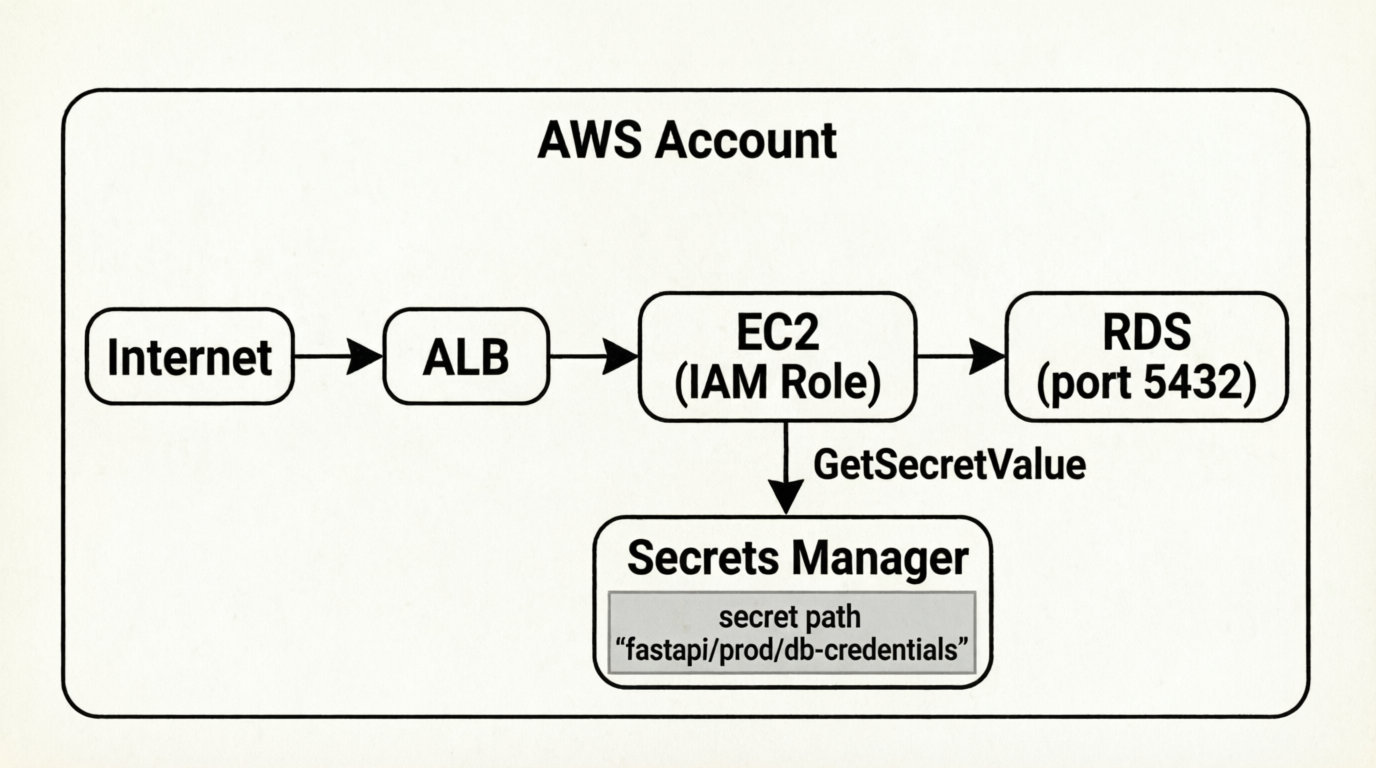
What Terraform manages:
- The RDS instance (password sourced from Secrets Manager data block)
- The IAM role and instance profile
- The security groups with least-privilege rules
- The CloudWatch log group
What Terraform does not manage:
- The secret value itself (created once via CLI, rotated by Secrets Manager)
- The application's live credentials (fetched at runtime by the app)
Sensitive Data Checklist
Run through this before every terraform apply that touches credentials:
- Are secrets stored in AWS Secrets Manager, not in
terraform.tfvarsor.envfiles? - Are all secret variables declared with
sensitive = true? - Is the S3 state bucket encrypted (AES256) and access-logged?
- Does the state bucket IAM policy restrict read access to only the roles that need it?
- Are IAM policies scoped to specific resource ARNs (not
"*")? - Is
user_datafree of credentials? (secrets fetched at runtime by the app) - Are RDS security groups restricted to the app SG, not a CIDR range?
- Is
deletion_protection = trueon the RDS instance in prod? - Is the secret name parameterized by environment so dev and prod never share credentials?
Common Mistakes
Putting credentials in user_data. The most common mistake. user_data is base64, not encrypted. Visible in the EC2 console to anyone with EC2 read access. The fix is to pass only the secret name, and have the app fetch the value using its IAM role.
Sharing secrets across environments. Dev and staging should never use the prod database password — or any prod secret. Name secrets with the environment in the path: fastapi/dev/db-credentials vs fastapi/prod/db-credentials. The IAM policy for each environment's role can then be scoped to only its own path.
Using aws_secretsmanager_secret_version as a resource instead of a data source. If Terraform creates the secret version, the value is in your Terraform code — which likely ends up in git. Create the initial secret value via CLI or a dedicated secrets management workflow. Let Terraform only read it.
Logging the full connection string. DB_USER in /health — fine. DB_PASS — never. Log the username and database name for debugging; filter the password at the application level before anything hits a log sink.
Good progress, what next?
The FastAPI deployment now has a real persistence layer, and the credentials for it never appear in Terraform code, plan output, CI logs, or user_data. The application fetches them at runtime using its IAM role — which is the AWS-native pattern that most production services use.
The key shift is understanding where Terraform's responsibility ends. Terraform provisions the infrastructure that can access secrets. The actual secret values live in Secrets Manager, managed separately, rotatable without any Terraform changes.
Next up: Terraform workspaces — how they compare to the directory-per-environment pattern and when each makes sense.
This post is part of a 30-day Terraform learning journey.
💬 Comments
No comments yet. Be the first to share your thoughts!
Leave a Comment